Africlock Manual
Menu

Insert/change a piece work entry

Insert/change a piece work entry
This window allows you to create piece work records for employees. Please note that the same activity cannot be used on the same date more than once. If there is more than one entry, combine the two in one.
1

Employee

1. Employee
Type the employee number or use the LIST button to choose an employee.
2

Date

2. Date
The production date.
3

Activity

3. Activity
Click the arrow to obtain a list of available activities (piece work description), then click the applicable activity.
4

Quantity

4. Quantity
The number of units produced by the employee for the particular activity and date.
5

Related clock records

5. Related clock records
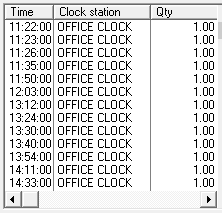
A list of recent piece work records for this employee.
6

Remarks

6. Remarks
If you have any remarks to attach to this production record, type them here.
77. OK (Save)
Save the values currently displayed.
88. Cancel
Close the window without saving anything.
9

Help message

9. Help message
This is a help area with context sensitive messages to assist you in completing the form.
The online help was made with Dr.Explain