Africlock Manual
Menu

Insert/change a standard activity

Insert/change a standard activity
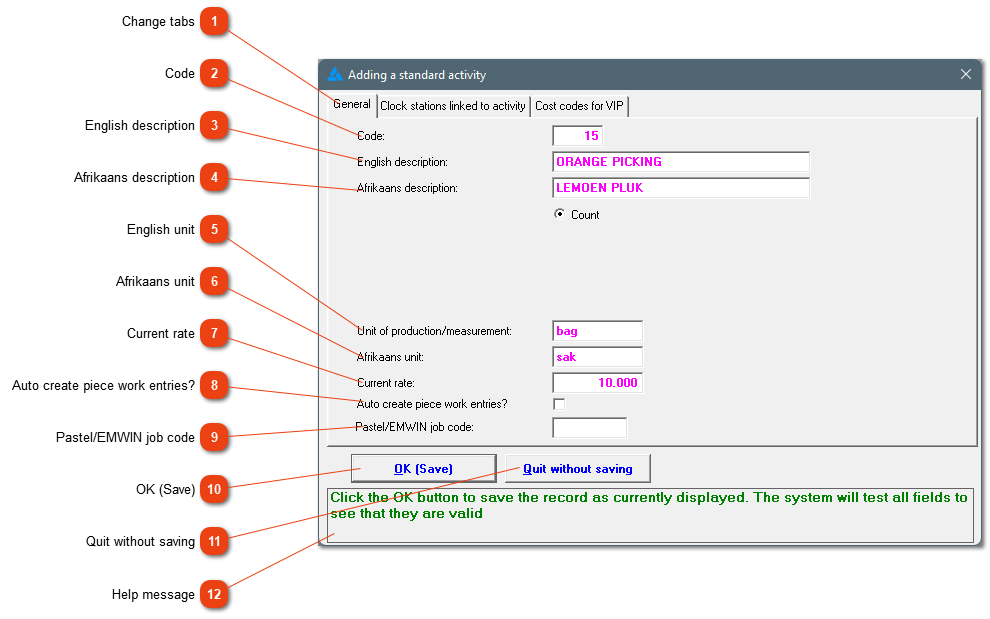
Adding of a new piece work activity.
1

Change tabs

1. Change tabs
The specific activity can be linked to a clock and/or cost codes for the use with your VIP payroll, to create a piece work export.
2

Code

2. Code
Assign a numeric code to the activity. The system will suggest a code but you can change it to suit your requirements. The code is used internally to identify the activity.
3

English description

3. English description
The English description for the activity.
4

Afrikaans description

4. Afrikaans description
The Afrikaans description for the activity.
5

English unit

5. English unit
This is the standard quantity by which production is measured for example bags filled, bottles washed, rows planted, single items (units) produced.
6

Afrikaans unit

6. Afrikaans unit
The Afrikaans name for the unit of production.
7

Current rate

7. Current rate
The amount the employee receives per unit.
8

Auto create piece work entries?

8. Auto create piece work entries?
This block needs to be checked when the employees clock for their piece work records and the system should convert the records. The only time that this block should not be checked, is when the clock movements are used to control times and the records aren't used for piece work records.
9

Pastel/EMWIN job code

9. Pastel/EMWIN job code
Enter the job code, if this is applicable to your setup. If wages are done on Africlock, keep this block empty.
1010. OK (Save)
Click here to save the information.
1111. Quit without saving
Close the window without saving the information.
12

Help message

12. Help message
This is a help area with an appropriate message.
 
The online help was made with Dr.Explain