To properly display this page you need a browser with JavaScript support.
Africlock Manual
Menu
Search
Main screen
Tables
← Previous page
Next page →
TODO: To change the footer's content go to Dr.Explain menu
Options : Project Settings : HTML (CHM) Export : Setup HTML Template and Layout
To properly display this page you need a browser with JavaScript support.
Tables
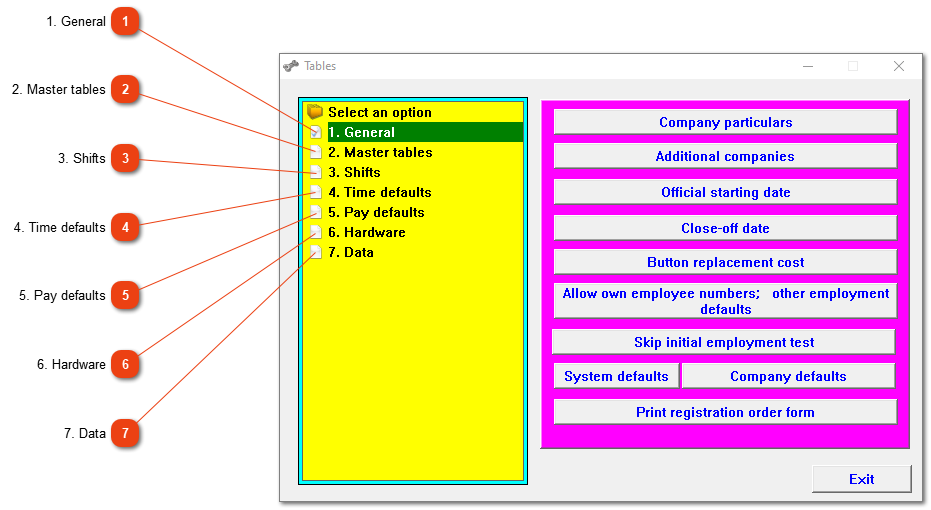
Several main options under tables.
This
section of the tables menu provides access to the company details, default settings and a number of miscellaneous functions.
Top
Provides access to the
main data
.
Top
Opens a menu with
options
for assigning time programmes to employees, overriding existing time programmes, options to move workers to a different time programme, exceptions with regards to time programmes and printing of duty rosters.
Top
Time
and conversion defaults.
Top
Matters relating to pay slips, detail on
pay slips
, etc.
Top
Clock adjustment history, importing of button numbers, repairing of data modules and serial ports can be seen/done
here
.
Top
Miscellaneous
data
related processes.
Top
The contents of Tables
Access control to program
1. General
2. Master tables
3. Shifts
4. Time defaults
5. Pay defaults
6. Hardware
7. Data
The online help was made with Dr.Explain