Africlock Manual
Menu

Adding a manual clock movement

Adding a manual clock movement
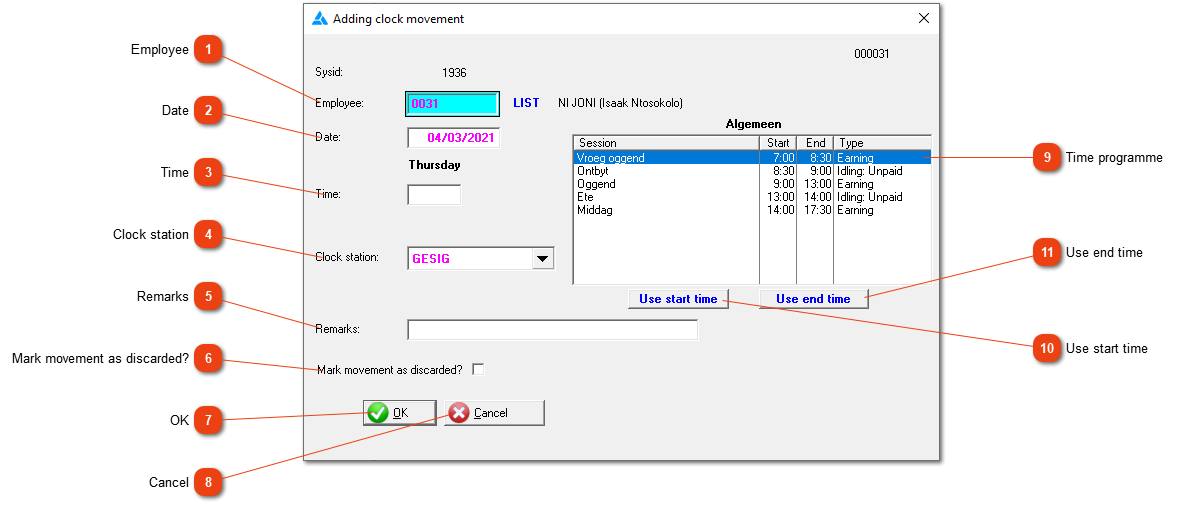
From time to time you will have to create a clock movement by hand (e.g. an employee forgot to clock in or out). This form allows you to do so. The clock movement will be marked to indicate that it was created manually.
1

Employee

1. Employee
Type the employee number or use the LIST button to choose an employee.
2

Date

2. Date
The date of the clock movement.
3

Time

3. Time
The time of the clock movement.
4

Clock station

4. Clock station
Click the down arrow to select the appropriate clock station from a list.
5

Remarks

5. Remarks
Type whatever remarks you think appropriate.
66. Mark movement as discarded?
Click here to create a 'discarded' clock movement.
77. OK
Save the values currently displayed.
88. Cancel
Close the window without saving anything.
9

Time programme

9. Time programme
Shows the employee's time programme for the date specified.
1010. Use start time
Create the clock movement using the start time of the first item on the list.
1111. Use end time
Create the clock movement using the end time of the last item on the list.
 
The online help was made with Dr.Explain