To properly display this page you need a browser with JavaScript support.
Africlock Manual
Menu
Search
Main screen
Movements
Movements: One button
← Previous page
Next page →
TODO: To change the footer's content go to Dr.Explain menu
Options : Project Settings : HTML (CHM) Export : Setup HTML Template and Layout
To properly display this page you need a browser with JavaScript support.
Movements: One button
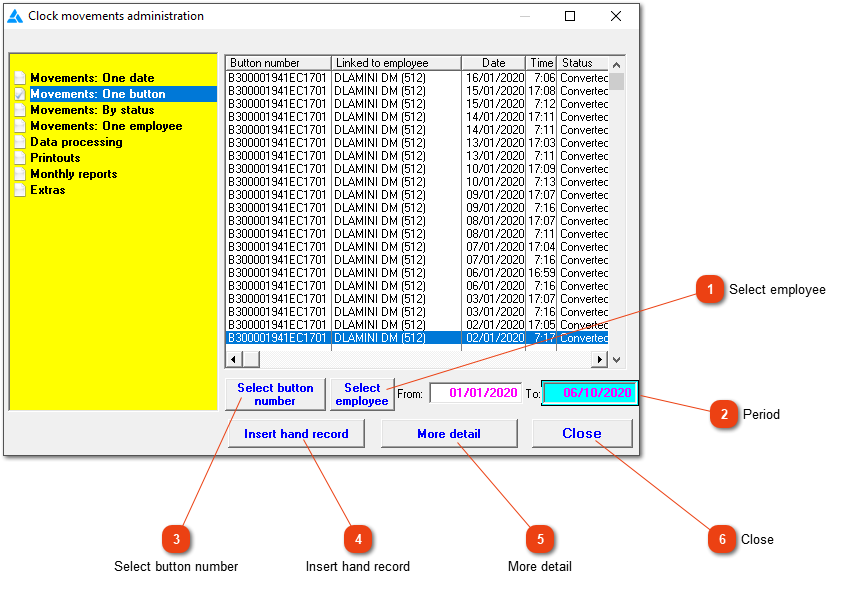
Use this 'One button' option to look at clock movements for a specific button number or employee.
Use this button to choose a specific employee from the list. First choose the period before the employee is selected.
Top
Period
Choose the applicable period.
Top
Use this button to select a specific button from the list. First choose the period before the button is selected.
Top
Click here to create a manual clock movement.
Top
A more advanced list of clock movements with extra sorting options, access to the personnel list and the ability to change clock station names and movement statuses. This screen is also available under
data processing
.
Top
Close the window.
Top
The online help was made with Dr.Explain