Africlock Manual
Menu

Company particulars for SARS Easyfile

Company particulars for SARS Easyfile
Company particulars needed by SARS to import the IRP5. This information can also be found and entered under Tables / Company particulars / Easyfile information and PAYE/SDL values.
1

User name

1. User name
The registered company's name on the system.
2

Postal address

2. Postal address
The company's postal address and code.
3

PAYE reference number

3. PAYE reference number
The PAYE reference number as registered with SARS.
4

SDL applicable?

4. SDL applicable?
Is the company SDL (Skills development Levy) applicable?
5

SDL reference number

5. SDL reference number
If applicable, this field will be available to add the SDL reference number.
6

UIF reference number

6. UIF reference number
The UIF reference number for SARS purposes.
7

Contact person: Name

7. Contact person: Name
The contact person's name. This can be the owner's, person working with the program or accountant's information.
8

Contact person: Surname

8. Contact person: Surname
The contact person's surname. This can be the owner's, person working with the program or accountant's information.
9

Telephone

9. Telephone
The contact person's telephone number. This can be the owner's, person working with the program or accountant's information.
10

VAT 403 major division

10. VAT 403 major division
Choose the applicable VAT 403 major division. Using the LIST button, all the divisions can be seen. If unsure, contact your accountant for the correct one.
11

VAT 403 activity code

11. VAT 403 activity code
The VAT 403 activity code is a sub category with regards to the major division. Using the LIST button, all the activities will be shown.
12

SIC7 code

12. SIC7 code
The 'Standard Industrial Classification' code. Using the LIST button, all the SIC7 codes will be available to make a choice.
13

Business phone number

13. Business phone number
This isn't a mandatory field, but if you want to provide this information, the business' telephone number can be added here.
14

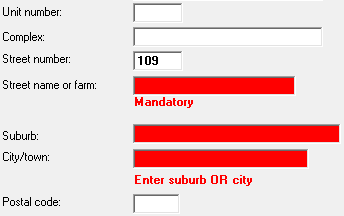
Address

14. Address
All the red fields must contain information for the export file to be created.
1515. OK
Click here to save the changes made.
1616. Cancel
Close the window without saving any changes.
 
The online help was made with Dr.Explain