Africlock Manual
Menu

Pay

Pay
This menu is used to create, to edit, delete or print the pay slips. Several reports can be printed, and different functions with regards to pay slips. Please note: Only the newest pay slip can be edited or deleted if the month has not been closed off.
 
1

Pay slips different sort orders

1. Pay slips different sort orders
All pay slips that have already been created, can be seen here under different sort orders. New pay slips can be added, already generated pay slips can be edited (if the month hasn't been closed off and it is the employee's newest pay slip).
22. Pay slips: One month
The pay slips can be filtered by period/group/pay methods.
33. Generate
Different options when generating pay slips.
44. Advances
Different options with regards to advances can be found here.
55. Meter readings
Water and electricity readings can be read in here before pay slips are generated. Previous readings can also be seen.
66. Loans / Savings
Loans and savings plans can be set up and kept up on the system.
77. Exceptions
Exceptions with regards to salaried workers' wages.
88. Printouts
Printouts directly applicable to pay slips.
99. Bank/Cash
Different options with regards to pay methods.
1010. Returns
Different returns can be found here for SARS, DOL and COID amongst others.
1111. Bargaining Councils
Various reports/returns can be found with regards to the bargaining councils.
1212. Tax
Reports and options directly applicable to tax.
1313. Play slip items
A list of pay slip items can be seen here, edited, added and discontinued.
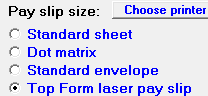
1414. Pay slip size
Set the correct paper size before printing pay slips. The general options used are 'Standard sheet' or 'Top Form laser pay slip'.
The online help was made with Dr.Explain