TODO: To change the footer's content go to Dr.Explain menu Options : Project Settings : HTML (CHM) Export : Setup HTML Template and Layout
Insert lunch breaks
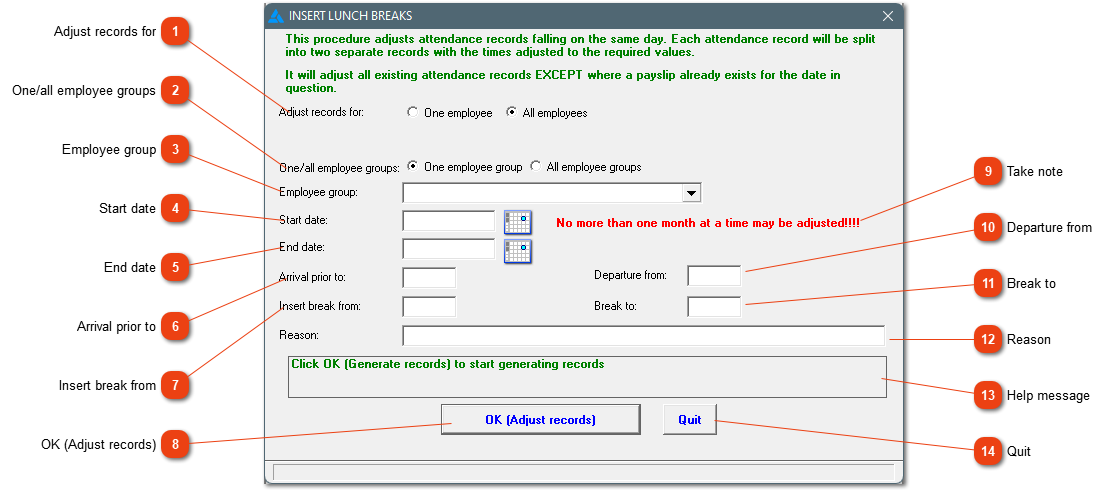
This procedure gives you the opportunity to add a lunch break in the attendance record when the time programme does not automatically deduct the break or where the employees cannot clock themselves out for lunch. This option works well when employees get a lunch break if they are on site for a certain amount of time, but otherwise not. This can be done for a period of time (start to end date). Employees that clocked in before a certain time and clocked out after a certain time, gets the lunch break as defined. Attendance records get divided into different records. Be careful before you do this procedure. If a mistake is made, attendance must be deleted and conversion must be done again.
Adjust records for
Should the adjustment be applicable for only one or all employees?
See #5. The system will look at any times earlier than define in #5 and departure times defined here. If one of the two times doesn't meet the requirements, the attendance record will not be changed.