Africlock Manual
Menu

Adjust arrival/departure to same day

Adjust arrival/departure to same day
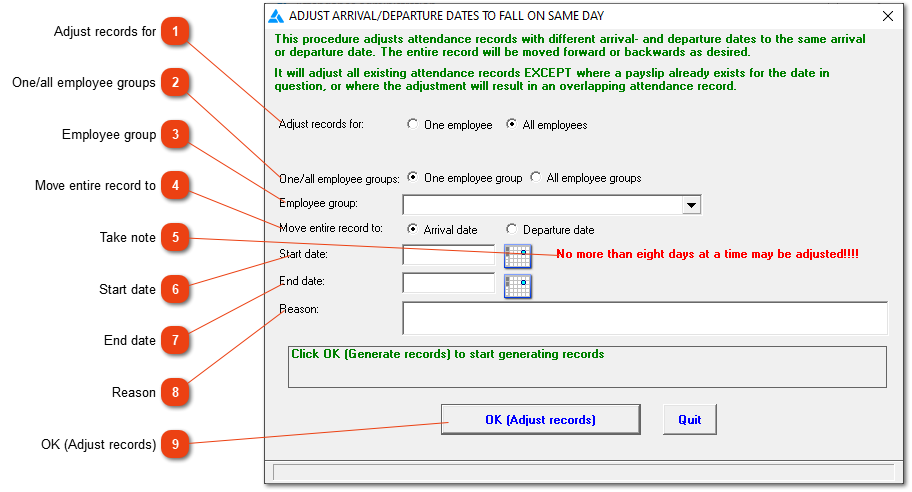
The entire record will be moved to the arrival or departure date. If the employee worked an 8 hour shift, the entire 8 hours will be moved to fall on one day. This is helpful where the employee has to be paid at a specific tariff for the entire shift.
1

Adjust records for

1. Adjust records for
Should the adjustment be applicable for only one or all employees?  If 'One employee' is chosen, a field will open to select the employee's number.
2

One/all employee groups

2. One/all employee groups
In the case of 'All employees', indicate whether the adjustment applies to one employee group or to all employee groups.
3

Employee group

3. Employee group
Select the employee group if applicable.
4

Move entire record to

4. Move entire record to
Should the record be moved to the arrival or departure date.
5

Take note

5. Take note
The time period (start and end date included) cannot be longer than eight days. If this isn't sufficient, the process can be repeated as many times as possible.
6

Start date

6. Start date
The first date that should be included when moving the records.
7

End date

7. End date
The last date that should be included when moving the records.
8

Reason

8. Reason
A reason can be supplied why the records are moved, but it isn't a necessary requirement.
99. OK (Adjust records)
Click here to move the records to one day.
Example:
 
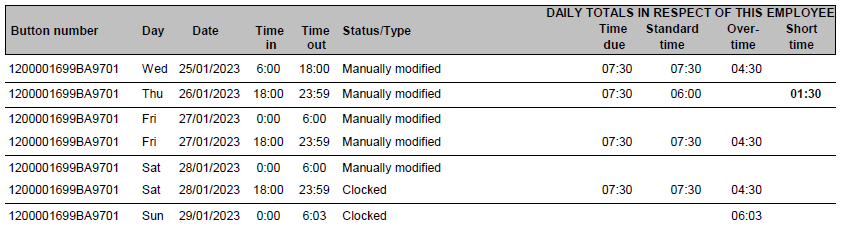
An attendance report of an employee who worked night shift:
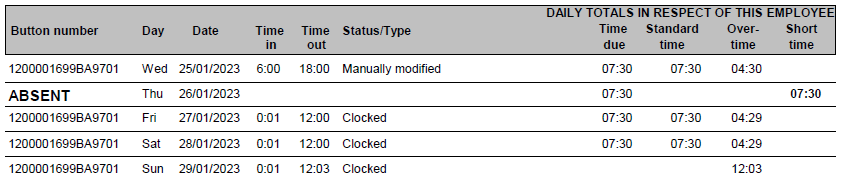
The adjustment was made to move the attendance record to the departure date, the date the employee clocked out.
The online help was made with Dr.Explain