Africlock Manual
Menu

A. Bank

A. Bank
 
This screen handles all bank related information with regards to each employee. The payment method is also specified here.
1

Payment method

1. Payment method
The two most common payment methods, are electronically or by means of cash. If 'Electronic' has been chosen, the employee's bank information must be available. If it isn't available, mark the method as cash and change it when the information is available.
2

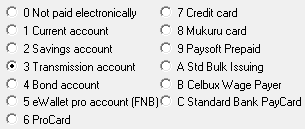
Bank Account Type

2. Bank Account Type
Choose the correct bank account type. This is important when bank exports are created in the system.
3

Bank Name

3. Bank Name
Enter the bank name, for example ABSA, FNB etc.
4

Bank Branch Name

4. Bank Branch Name
The appropriate branch name.
5

Bank Branch Code

5. Bank Branch Code
This is the field for the branch code.
6

Bank Account Number

6. Bank Account Number
The employee's bank account number must be entered here.
7

Bank Account Holder

7. Bank Account Holder
Who is the account holder?
8

Bank Account Holder Relationship

8. Bank Account Holder Relationship
What is the employee's relationship to the bank account holder?
9

Own payment reference

9. Own payment reference
This will be the reference used on the company's bank statement.
The online help was made with Dr.Explain