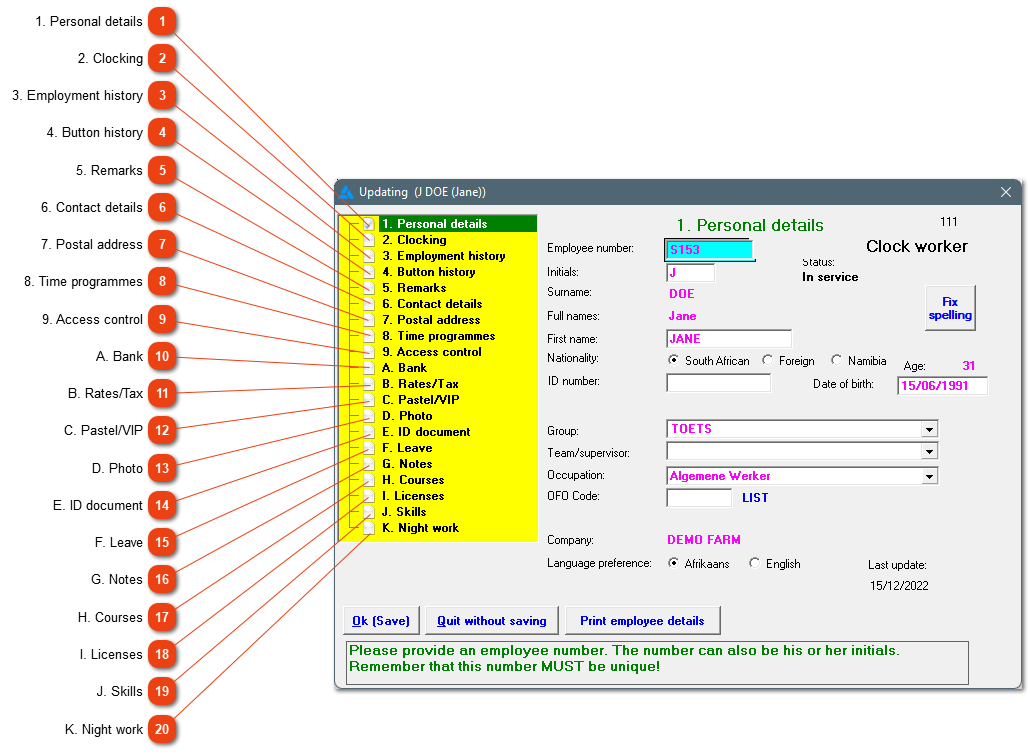
Data with regards to the use of clocking/diesel and how the system handle the raw data with conversion and the balancing of hours. If the employee should be a fuel user, this can also be marked here.
Information with regards to the employee's employment history is found here. The employee's services can be terminated, or they can be reinstated. The equity data can also be marked here.
Telephone numbers, the employee's email and physical address can be added here. The physical address is needed for the IRP5 and this will save a lot of time when it comes to the reconciliation time.
Here, the specific employee's time programmes will be shown. The employee can be placed on a time programme here. This allocation can be edited or deleted (if data hasn't been converted for the employee on this time programme).
The calculation method for annual leave and the amount of family responsibility days can be changed. The amount of annual leave available, will also be shown here.
Here you can enter notes with regards to the employee for example warnings etc. To see/print all the notes captured, the 'Print employee notes over a period' printout should be used.
Licenses applicable to the employee can be entered here. When opening the programme, a warning screen will appear two weeks before the actual expiry date. This screen will keep on appearing until the license has been renewed, and the date adjusted on the entry.