TODO: To change the footer's content go to Dr.Explain menu Options : Project Settings : HTML (CHM) Export : Setup HTML Template and Layout
3. Employment history
The employee's employment history can be checked here. In the table at the top, all appointments and terminations can be seen. The employee's services can also be terminated from this screen or reinstated. The current appointed entry can also be edited. Equity data should also be meticulously marked here.
If the employee is appointed, his/her services can be terminated here. The system requires a pay slip on the day of termination and no leave or attendance records should be later than this date.
Information on the most recent employment event can be edited with regards to the appointed date (if it corresponds to the history on the system), the duration of employment, whether the employee is a clock, salaried or piece worker and a couple of other employment options. Promotions for the equity report can be added here.
The last employment event will be deleted if it can be (for example no pay slips have been created after the date). If the event falls within a month that has already been closed off, the system won't allow this action.
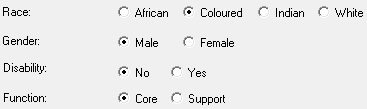
The equity details as shown here, will be used in the equity report. There is a setting that forces the completion of this information when a new employee is appointed. By doing this, the equity report can be generated without hassle. This setting can be changed here.
If the employee's marital status is important information within your company, it can be shown here. The only place where this will be shown in a printout is when the personnel list is exported to a csv.