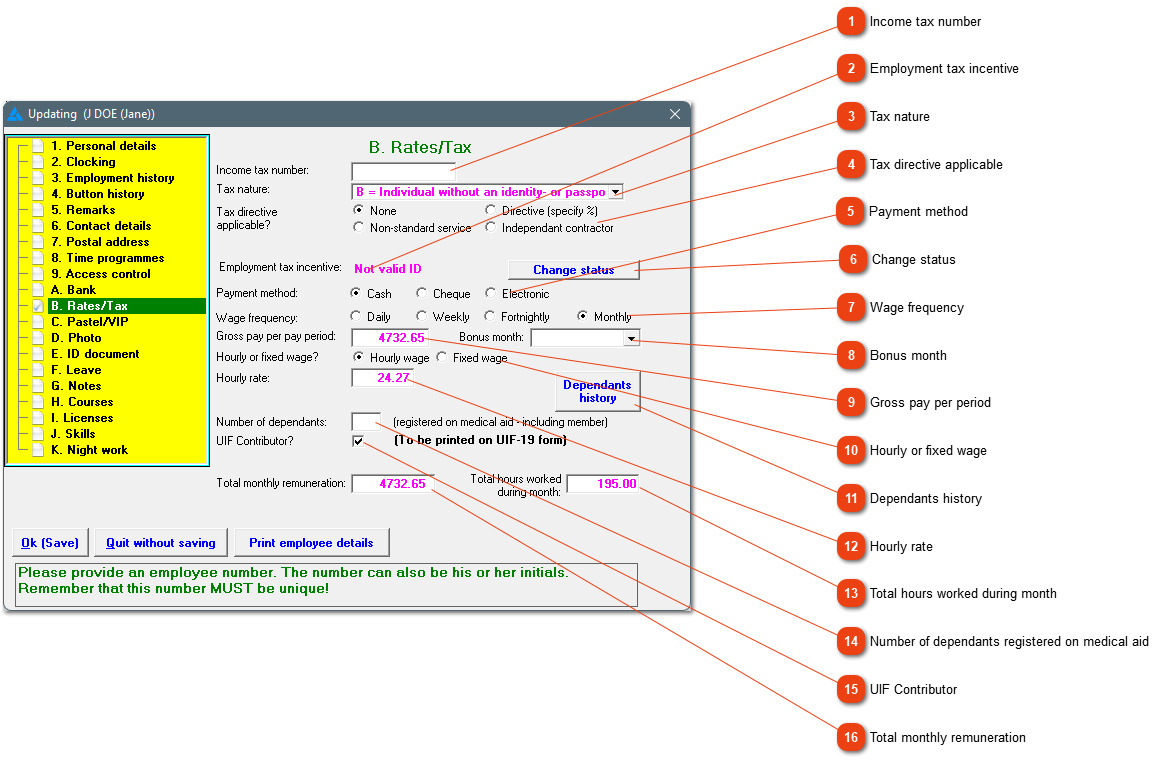
If the company participates in the government's employment tax incentive initiative, you must ensure that the employee's information are correct. The system will show if the employee qualifies for the initiative or not.
Choose between: A (Individual with an identity- or passport number), B (Individual without an identity or passport number), C (Director of a private company), M (Asylum seeker) or R (Refugee).
The system doesn't know if the employee is a related/connected person or a domestic worker. These types of people do not qualify for the ETI initiative. If it has not been marked, the employee's ETI status will say 'unknown'. The employee's status can be changed here.
How often are the employees paid: Weekly, fortnightly or monthly? A daily worker is paid a fixed rate per day, but will still receive money over a period.
If this is applicable to your company, a bonus month can be chosen. While creating pay slips in the bonus month, the system will remind you of the bonus. The bonus then needs to be added on the pay slips manually.
Payment (Gross) which employees receive in their payment period. If the employee is paid weekly, it will be the gross weekly pay that should be entered here.
Fixed wage: If all required time has been worked in the pay period, the employee will receive their set fixed wage. Short time will lead to a deduction of money and overtime will lead to more money. The employee will receive the same amount of money if all required hours have been worked. With hourly wage the employee is compensated for all hours worked. In a short month, the employee will receive less money and in a long month more.
History relating to the employee's medical aid can be seen here. Please note, this is only the history and you will not be able to edit this information.
The hourly rate the employee earns. The hourly rate is applicable when the employee is set on hourly wage and not at a fixed wage. The hourly tariff for employees on a fixed wage will be calculated by the system. If the hourly rate for a fixed wage employee is wrong, we must take a look at the time programme used.