Employment tax incentive: ETI status
The Employment Tax Incentive (ETI) is an initiative by the Government to promote employment of young people. The employment of qualifying youth results in a reduction of PAYE payable on the EMP201 return.
The ETI applies to workers aged between 18 and 29, first employed after October 2013, and earning less than R6,500 per month, but not less than the minimum wage for a particular sector. Family of the business owner and domestic workers are also excluded.
The maximum ETI is R1,500 per month. This is reduced by half after 12 months, and finally falls away after 24 months.
You can update your employees' ETI status by following the next steps:
1. Click on the Main Screen on the option: Personnel.
2. Select Appointments/Terminations from the list.
3. Select the option in pink/blue: Browse/edit complete employee list.
4. A personnel list will be displayed.
5. All employees that have already been sorted according to the criteria of SARS, will be marked as either 'Applicable' or 'Not Applicable' (N/A):
6. Employees who could not be sorted, will be displayed in red as 'Unknown':
7. Double click on each 'Unknown employee' (individually), whereby the employee’s personal profile will be displayed.
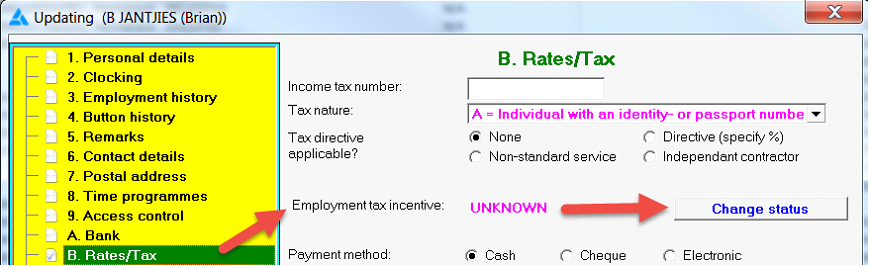
8. To complete the required information, click on the option in the yellow block: Rates/Tax.
9. Look for the item on the right hand side: Employment tax incentive: UNKNOWN:
10. Next to the employee's ETI status you will find an option: Change Status.
11. Click on: Change Status.
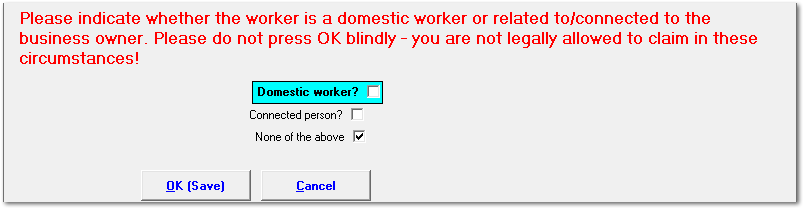
12. Indicate whether the employee is a DOMESTIC WORKER (If not, leave the block open).
13. Indicate whether the employee is CONNECTED (related) to the employer (If not, leave the block open).
14. Click on: OK (Save).
15. As soon as an employee's outstanding information has been completed, his/her status will no longer be shown as 'Unknown' and the status will be reflected as 'Applicable' or 'Not Applicable'.
If 'Applicable', the worker will be included in the ETI calculation with the submission of the monthly EMP201.
ETI calculation: The system applies the calculations as set out by SARS.