TODO: To change the footer's content go to Dr.Explain menu Options : Project Settings : HTML (CHM) Export : Setup HTML Template and Layout
Adding a new time programme
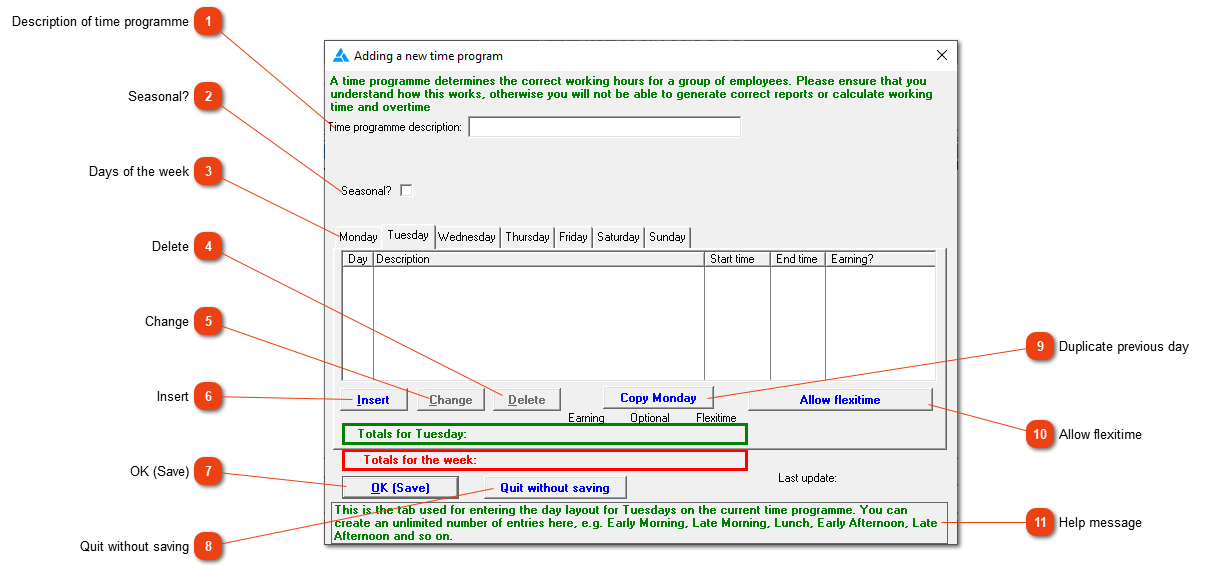
This window allows you to create time programmes or working schedules. Please note that you should not have a programme exceeding 45 or 48 hours per week unless you have a very specific reason (farm workers may work up to 50 hours in peak season, provided that the period is followed by a 40-hour low season work week for the same length of time).
Description of time programme
The name of the time programme for example 'Day shift', 'General workers', 'Night shift' (something descriptive).
Setting up seasonal overrides automatically. A period of 50 hour weeks can be offset with a period of 40 hour weeks. Please phone the office so that one of us can assist in setting this up.
In the example above, Tuesday's working sessions and lunch break were entered individually and are about to be saved. If they are the same as Monday's, all this could have been done in one operation simply by pressing the 'Copy Monday' button. This button (with varying day names) appears whenever the list of working sessions/breaks for a particular day is empty, and allows you to copy the details for the day preceding the currently selected one.
If you have a large number of shifts differing only slightly from each other (this can happen in a complex business such as a supermarket with a butchery and bakery as part of the same business) it may be a good idea to make use of flexitime. When doing this, you will be less specific about exact working times, while still retaining the ability to define breaks and the required number of working hours for each day.