TODO: To change the footer's content go to Dr.Explain menu Options : Project Settings : HTML (CHM) Export : Setup HTML Template and Layout
Standard time programmes
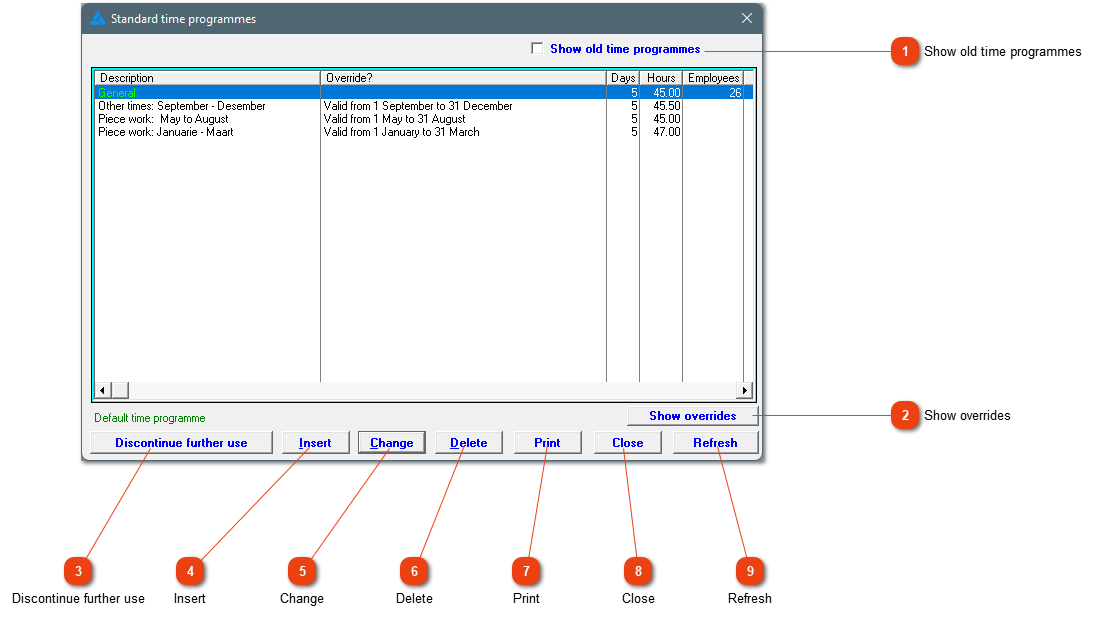
A list of standard time programmes within the system. A time programme is simply a schedule of working hours. You can have as many of them as you need, but do not go overboard as this will complicate your life.
PLEASE NOTE: It is advisable to contact us when busy with time programmes. We have a lot of experience in this regard. The water might be deeper than expected!
This is a list of your standard time programmes. A time programme is only a breakdown of working hours. Note that there are restrictions in terms of the labor law on how many required hours there my be in a week. You can specify times or set up a flexi time programme where you tell the system that the employee must work a certain number of hours per day.
When this check block is marked, it will also display all old time programmes that are no longer in use.
The system has the ability to automatically move from one time programme to the next. According to law, a period of 4 months with more required hours is legal if there is a period of 4 months with less required hours. 'Show overrides', will show you the time programmes that will override a certain time programme, dates associated with these programmes and gives you the ability to change dates of the specific override.
Discontinue the use of the selected time programme. This can only be done if there isn't any employees linked to the specific time programme. If you ever want to use a discontinued time programme again, mark the check box 'Show old time programmes' as discussed above. Mark the applicable time programme and choose 'Reverse'.
Click here to change an existing time programme. The programme will not allow any changes if pay slips have been created (where the time programme has been used to generate attendance records).
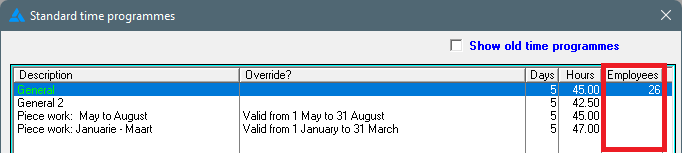
The amount of employees allocated to a certain time programme, is shown in the column on the right hand. This column isn't refreshed immediately. If you have moved employees to another time programme, and you want to check these numbers, click 'Refresh' for the system to update them.