TODO: To change the footer's content go to Dr.Explain menu Options : Project Settings : HTML (CHM) Export : Setup HTML Template and Layout
Buttons
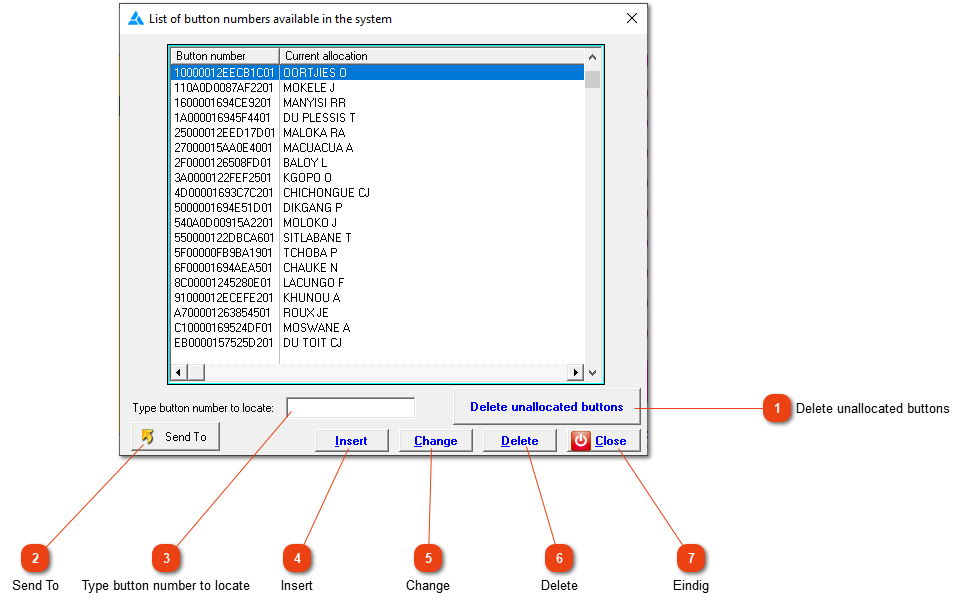
A list of all buttons that have been entered into the system and their current assignments. You can create, change or delete button records and perform other actions as well.
This link will delete all buttons that aren't allocated in the system. The buttons can be imported into the system at a later stage again.
Typing a button number WITHOUT FIRST CLICKING HERE will make the locator bar jump to that number (or to the nearest match if that number does not exist). To find another button number, use BACKSPACE to clear this field, then type the new number. Alternatively, you can use the normal navigation buttons (up, down, PgUp and PgDn) to find a specific button.
Click to add a button to the list. You can also simply clock the button on any fixed or portable clock to automatically add it to the list, or you can use a button reader to capture the number.
Click to remove a button from the list. The system will refuse to do this if the button is allocated to an employee. If the button is removed and subsequently used again, it will reappear in the list.