Changing an attendance record
An attendance record can be changed.
 Record created using button
The button number that the employee clocked with for the specific attendance record.
|
|
 Employee
The applicable employee.
|
|
 Date clocked in
The date the employee clocked in. This can be changed. Just remember to change the date clocked out as well.
|
|
 Day clocked in
The day the employee clocked in.
|
|
 Time clocked in
The time the employee clocked in. This can be changed.
|
|
 Date clocked out
The date when the employee clocked out. Ensure that it matches the date clocked in.
|
|
 Time clocked out
The time the employee clocked out.
|
|
 Day clocked out
The specific workday the employee clocked out.
|
|
|
Click here to save the information.
|
|
|
Close the window without saving the information.
|
|
 Record creation
The manner in which the record was created will be shown here.
|
|
 Clock
The name of the clock station that was used.
|
|
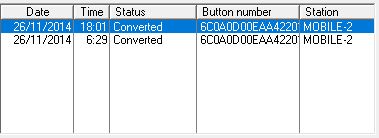
 Related clock movements (if any), occurring in the same period
Converted clock records, that relates to the attendance record, will be shown here.
|
|
 Standard time worked
The amount of standard time, that falls within the defined hours of the time programme.
|
|
 Overtime worked
Any time that does not fall within the defined time programme.
|
|
 Remarks
You can make whatever notes you think necessary for future reference here.
|
|
 Record captured by
If you use user administration, the user's name that worked on the record, will be printed here.
|
|
 Help message
This is a help area with context sensitive messages to assist you in completing the form.
|
|