Africlock Manual
Menu

Clock stations

Clock stations
A list of all clock stations in use.
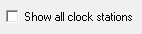
11. Show all clock stations
Check this block if you want to see all the clock stations that have been used on your system. This will show the discontinued stations as well.
22. Discontinue further use
If a clock station isn't in use anymore, it can be marked on the list (by clicking on it once) and discontinued by choosing: 'Discontinue further use'.
 
If the clock station is in use again, check the block 'Show all clock stations' as described above. Mark the appropriate clock station and choose 'Reverse'.
33. Insert
Click here to add a clock station.
44. Change
Click here to change an existing clock station name.
55. Delete
The system does not allow you to delete clock stations, so add new ones with care.
66. Ping
This is a tool to ping a biometric clock that works with an IP address to find out if it is communicating with the computer.
77. Close
Click here to close the window.
 
The online help was made with Dr.Explain