TODO: To change the footer's content go to Dr.Explain menu Options : Project Settings : HTML (CHM) Export : Setup HTML Template and Layout
Interim pay slips
Interim pay slips can be generated where additional income needs to be paid out to an employee. Examples of such payments are: Additional bonus in the middle of the month, wage correction and commission.
To generate an interim pay slip, follow the steps below:
1. Click on the Main Screen on: Pay.
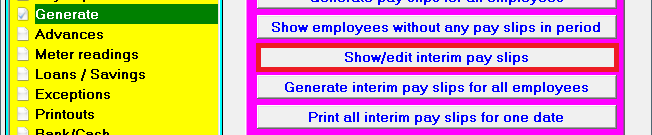
2. Select from the options in the yellow block: Generate.
3. Select from the options on the right hand side in pink/blue: Show/edit interim pay slips:
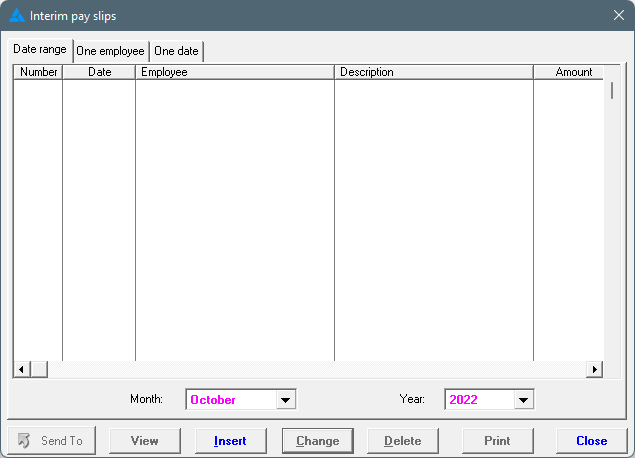
4. A screen where interim pay slips can be generated will open. Click at the bottom of the screen on: Insert.
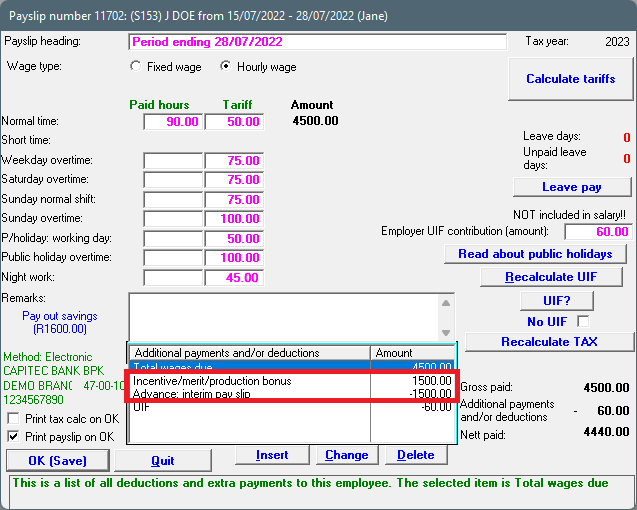
5. Complete all the fields required. Select the correct pay slip item by clicking on the black 'dropdown' arrow:
6. Click on: OK (Save).
7. The interim pay slip will be displayed on the following screen, from where it can be printed:
8. Payments made through interim pay slips will be taken into account in the next pay period, and will show on the following pay slip as an income already paid out. Where an employee is liable for PAYE, it will be deducted accordingly. However, an interim calculation of tax will already be done on the interim pay slip and this amount will be deducted from the amount payable to the employee.