TODO: To change the footer's content go to Dr.Explain menu Options : Project Settings : HTML (CHM) Export : Setup HTML Template and Layout
Advances
Advances can be used where employees ask for an advance on their wages, where they buy things from the shop, where they have done good work and you want to add extra wages for a certain day. When using advances you can enter information into the system as it happens and then create pay slips where all these advances will then be added to the pay slip.
To create an advance, follow these steps:
1. Click on the Main screen on 'Pay'.
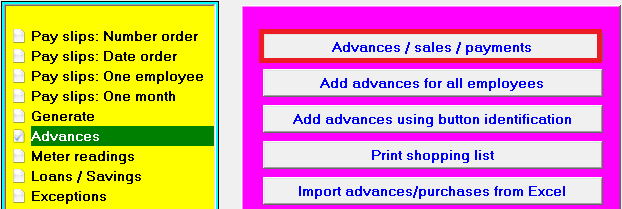
2. On the yellow side, choose: Advances
3. On the pink/blue side choose: Advances / sales / payments:
4. A screen opens where advances / sales / payments can be added, changed or deleted. Click on 'Insert'
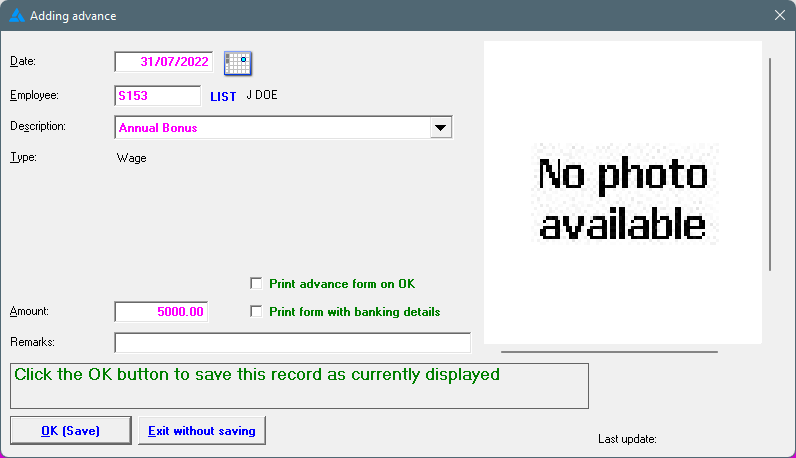
5. The below screen opens where a new entry can be added. Complete all necessary fields.
6. Choose the correct pay slip item by clicking on the 'dropdown arrow'. If the correct item hasn't been created yet, the item must first be created.
7. The advance will indicate if the item is a wage or a deduction; complete the amount. A remark can be added, if needed (the remark will replace the description on the pay slip):
8. Click on OK (Save)
9. The advance amount will be added to the next pay slip, provided the dates fall within the pay period.
10. Advances added is not a recurrent transaction and will only be brought into account once.
11.The option is available to add advances for a group of employees where the same item and the same amount are applicable. Select the option on the right hand side in pink/blue: 'Add advances for all employees':
12. Advance entries can also be imported with an Excel file.