There is an option on the system where overtime can be saved in a savings plan, which can be paid out at any given time.
To 'save' the overtime, follow these steps:
1. Create the pay slip for the correct period.
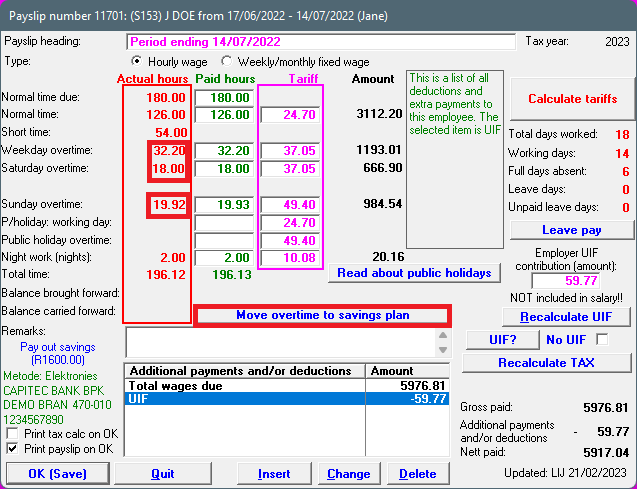
2. Overtime will be shown and calculated on the pay slip.
3. To 'save' the overtime, click on the option: 'Move overtime to savings plan'
4. Indicate which overtime amounts should be moved to the SAVINGS PLAN (weekday overtime, Saturday overtime, Sunday overtime, all overtime).
5. Click on: OK (move to savings plan):
6. The pay slip will still show the overtime, but another entry will be added: 'Savings deposit : overtime' which deducts the overtime, and you'll see that the savings plan will increase:
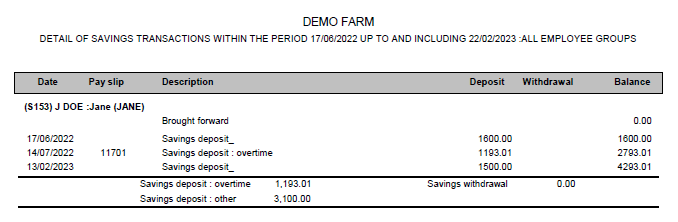
7. Saved overtime can be seen under the Savings plan transactions.
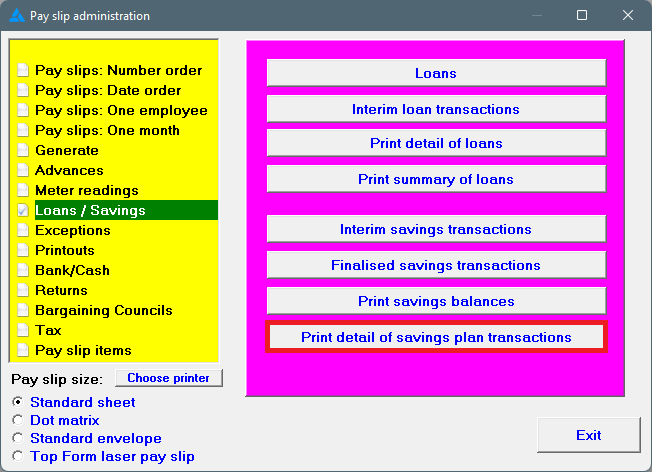
8. If you want to check yourself, click on the main screen on: Pay.
9. In the yellow block, choose: Loans / Savings
10. On the right side in the pink/blue, choose: Print detail of savings plan transactions:
11. A report is shown with every employees' savings money, within a certain period:
12. The savings plan will accumulate when additional amounts are saved, or additional overtime is moved to the savings plan.
13. The total balance of the savings plan, or part of it, can be paid out when requested by the employee.