instalments of loans granted to employees can be recovered using the payroll.
The correct procedure is to add the loan first, indicate the instalments and thereafter generate the pay slip.
To add a loan, follow the steps below:
1. Click on the Main Screen on: Pay.
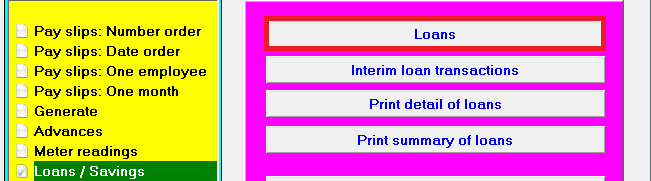
2. Select from the options in the yellow block: Loans / Savings.
3. Select from the options on the right hand side in pink/blue: Loans.
4. A screen 'Loans' will be displayed. Click at the bottom on: Insert.
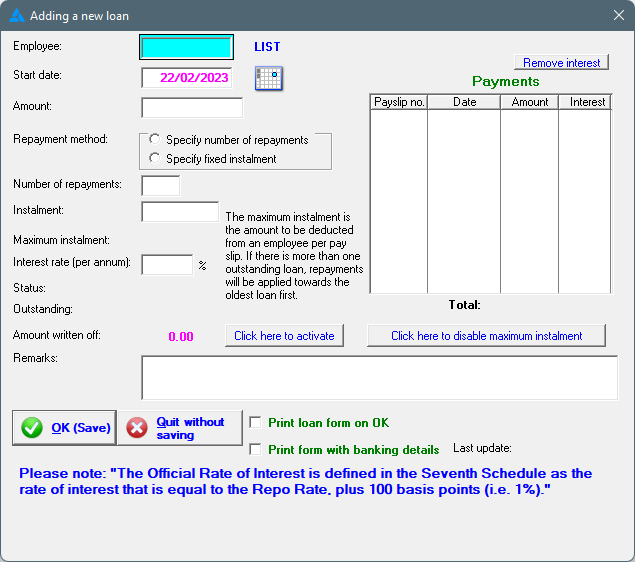
5. A screen 'Adding a new loan' will open. Complete the fields as required.
6. Select the repayment method: Either a specified number of repayments, or a fixed instalment.
7. Indicate the maximum instalment that can be deducted. This means that, in the event of an employee having more than one loan at the same time, the total repayment amount on his/her pay slip will not exceed the specified maximum amount.
8. Click at the bottom on: OK.
9. The stipulated repayment amount will be deducted on the following pay slip and the deducting balance will be reflected on the pay slips.
10. The loan repayments will automatically stop upon reaching a ZERO balance.
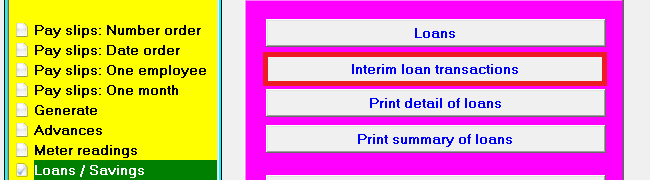
11. Additional interim payments by the employee on the loan must be inserted by choosing the option 'Interim loan transactions' in order to update the balance accordingly.
12. Where employees request that an additional amount, over and above his normal instalment, be recovered from his salary at the end of a particular month, the loan repayment amount can be changed accordingly on the pay slip for that month.
13. History of loans finalised, as well as loans written off will be available.
HANDLING OF MORE THAN ONE LOAN AT A TIME
It is possible to deduct more than one loan simultaneously from an employee's wage. A maximum amount may also be specified where the system will not deduct more than that.
The process of collecting more than one loan's instalment, is as follows:
1. With the first loan, a maximum instalment that can be deducted, must be specified. See example below:
2. The instalment due (either a fixed amount or a specified number of payments), will be deducted automatically when generating pay slips.
3. On the issuing of a second loan, the maximum instalment as specified in the first loan, will still be applicable. If needed, the specified maximum on the first loan may be increased to allow a larger repayment.
4. The specified maximum instalment will not be exceeded when deducting the premiums of all the loans. Where a maximum of R250.00 was specified, and the loan instalments are individually agreed on R200.00 and R100.00 each, an amount of R200.00 with regard to the first loan and only R50.00 with regard to the second loan will be deducted (maximum R250.00) until such time that the first loan is settled. On finalization of the first loan, the second loan's instalment will automatically be increased to R100.00.
5. The same method of recovery for more loans will be followed.
6. In the event of a third and fourth loan that must stand over due to the specified maximum instalment, the full outstanding amount of these loans will be printed on the employee's pay slip.
7. In order for you to distinguish between the different loans that were granted for different reasons, for example, purchasing of meat, funeral, illness, etc, you can indicate the reason for the loan by inserting the specified reason under the 'Remarks' option. The reason for the loan will then be printed on the pay slip as well. Example: Meat, original amount R1000, outstanding R800.
LOANS WITH INTEREST
Calculation of interest on loans:
When adding a loan to an employee’s pay slip in Africlock, you have the option to calculate interest on the outstanding balance of the loan, for which the employee will also be held responsible.
When deciding to charge interest on outstanding loans, it is important to take note of the following:
1. Interest will be calculated per annum, and added to each pay slip. When adding a loan for the first time on an employee’s pay slip, the total days from granting the loan to the end date of the pay slip, will be counted to calculate interest due on that specific pay slip. The formula of calculation being:
Total days x interest rate x Outstanding amount
365
For the calculation of interest on the following pay slips, the total days from the start date of the new pay slip to the end date of the pay slip, will be used to calculated interest due on that specific pay slip.
2. It is important to remember that certain legislative restrictions should be adhered to with regard to the charging of interest on loans. An employer may not at any time have more than 100 loans, alternatively a maximum of R500,000 outstanding. Should this limit be exceeded, the employer is obliged to register as Credit Provider with the Financial Services Board.
3. There are also limitations with regards to the maximum percentage of interest that might be charged. The formula for interest calculation is:
(Repo interest rate at any given time x 2.2) + 10.
4. When you add a loan, the screen 'Adding a new loan' will open. Complete the fields as required:
5. The repayment starting date of the loan must be considered carefully and completed. Ensure that the date selected falls within the date range of the pay slip on which the first instalment needs to be deducted. If it is later than the end date of a pay slip, the deduction will be held over to the next pay period.
6. Select the repayment method: Either a specified number of repayments, or a fixed instalment.
7. Indicate the maximum instalment that can be deducted. This means that, in the event of an employee having more than one loan at the same time, the total repayment amount on his / her pay slip will not exceed the specified maximum amount.
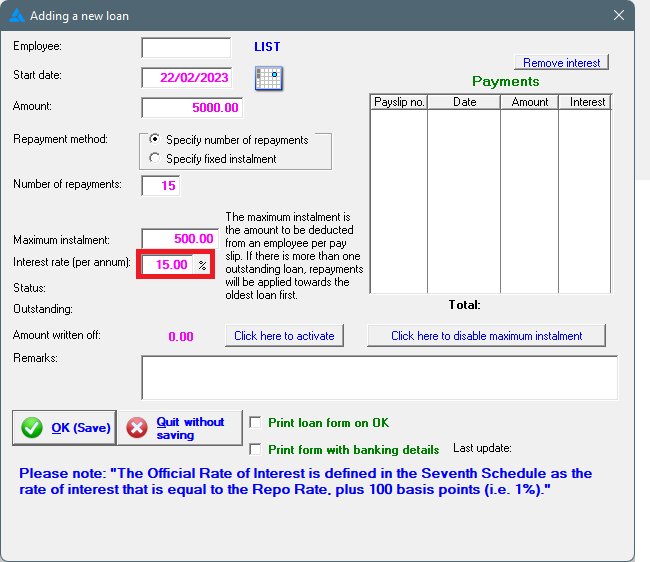
8. Also indicate the interest that needs to be calculated on the outstanding amount, in percentage PER ANNUM, not per month:
9. Click at the bottom on: OK.
PRINT DETAIL OF LOANS ON PAYSLIPS:
The detail of loans, including the interest charged, and balances due, can be printed on the pay slip. In order to print the detail, you will have to activate the option beforehand, following the steps shown below:
1. Click on the Main Screen on: Tables:
2. Select from the options in the yellow block: Pay defaults.
3. Select from the options on the right hand side in pink/blue: Print detail on pay slips:
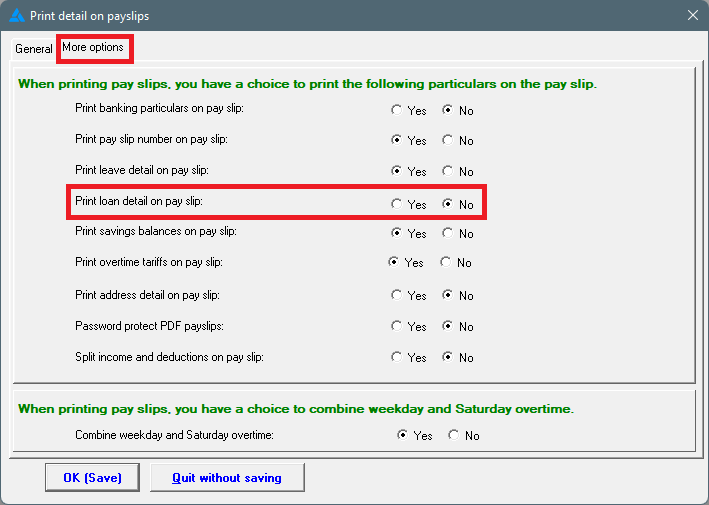
4. The following screen will appear: Print detail on pay slips.
5. Select the second 'tab' as per the example below: More options: When printing pay slips, you have the choice to add loan detail or not. Choose: Yes.
7. Click on: OK (Save).
8. The option to print detail of loans on pay slips, will now be activated.
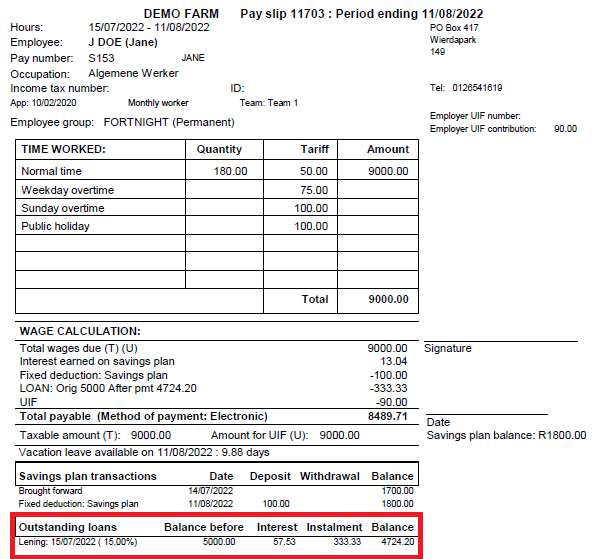
9. See below an example of a pay slip of an employee with one loan.
Interest of 15% is calculated on the loan. At the bottom of the pay slip the Rand value of the interest will be shown in the 'Interest Column'. The outstanding balance of the loan, including interest, will be shown in the far right column.