TODO: To change the footer's content go to Dr.Explain menu Options : Project Settings : HTML (CHM) Export : Setup HTML Template and Layout
Wage adjustment: single employee
Wage / tariff adjustments for individual employees can be done as follows:
OPTION 1
BEFORE PAY SLIPS ARE GENERATED:
1. Click on the Main Screen on: Fix employee.
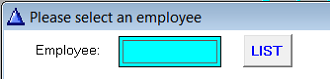
2. Select the correct employee from the list. The employee's personal profile will be displayed.
3. Click on the white screen in the left corner at the bottom on: Employee Profile.
4. Click on: Rates/Tax (in the yellow block).
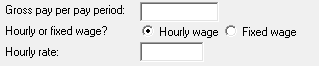
5. The employee's current gross pay for every pay period will be reflected on the right hand side of the screen (either hourly wage or fixed wage).
6. Change the gross pay per pay period to the new tariff as required.
7. Click on: OK (Save) to confirm tariff adjustment.
You can also do the adjustment while doing pay slips - in this case, the system will automatically adjust the employee's personal profile in accordance with the new tariffs.
OPTION 2
ON THE NEW PAY SLIP
Choose 'Calculate tariffs, marked in red:
The following screen will be shown. Change the hourly wage (as in this case), or the fixed wage (if that is the pay method).
Very important information will be given on this screen. 'Hours per week' comes from the time programme or employee set up. It doesn't help to change the numbers here every time, the time programme or required hours per day should be adjusted.
Click on 'OK (Save)' so that the system does the necessary calculations.