Mass-create attendances: one worker as model
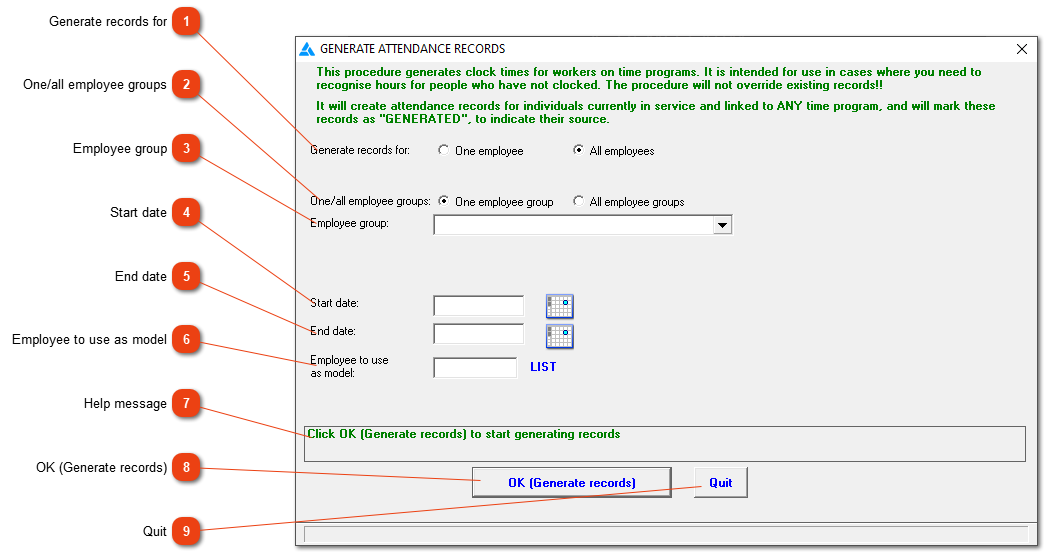
Attendance records for one employee (model) will be duplicated for the other employees.
 Generate records for
Indicate if the records should be generated for one or all employees.
|
|
 One/all employee groups
If 'All employees' is chosen, indicate if the records should be generated for one employee group or all employee groups.
|
|
 Employee group
If 'One employee group' is chosen, choose the correct group from the list of employee groups.
|
|
 Start date
From which date should the records be generated?
|
|
 End date
The last date to be included in the period.
|
|
 Employee to use as model
The employee you choose here will be the model on which the system will generate the other employees' records.
|
|
 Help message
This is a help area with context sensitive messages to assist you in completing the form.
|
|
|
Click here to generate the records as stipulated in the form.
|
|
|
Close the window without generating records.
|
|