|
Africlock Manual
|
|||||
|
|||||
|
TODO: To change the footer's content go to Dr.Explain menu Options : Project Settings : HTML (CHM) Export : Setup HTML Template and Layout
|
|
Africlock Manual
|
|||||||
|
|||||||
|
TODO: To change the footer's content go to Dr.Explain menu Options : Project Settings : HTML (CHM) Export : Setup HTML Template and Layout
|
|
Contribution description
|
Pay slip item to use
|
SARS code
|
|
Employer contribution
|
Medical aid contributions by employer
|
3810
|
|
Screen
|
Steps
|
|
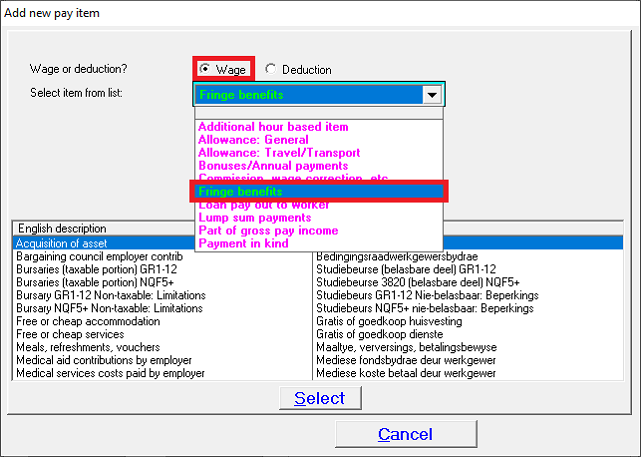 |
- Pay;
- Pay slip items;
- Insert;
- Wage or deduction? Choose Wage;
- Select item from list: Choose Fringe benefits.
|
|
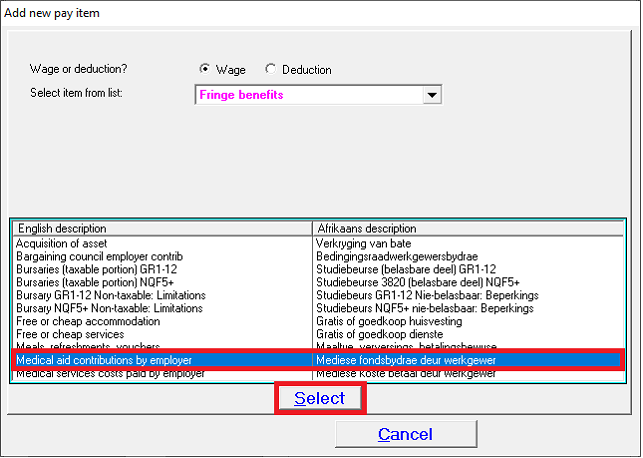 |
- Locate and click on Medical aid contributions by employer;
- Click on Select.
|
|
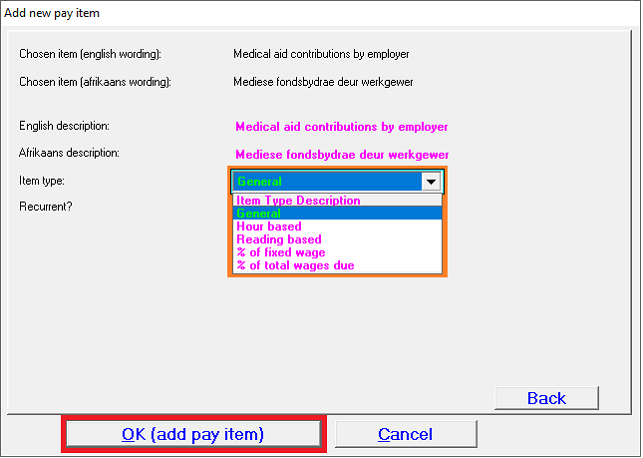 |
- Item type:
Choose one of the following options from the dropdown list:
· General (fixed amount)
· % of fixed wage
· % of total wages due
- Click on OK (add pay item).
|
|
|
Contribution description
|
Pay slip item to use
|
SARS code
|
|
Employee/member contribution
|
Medical aid contribution
|
4005
|
|
Screen
|
Steps
|
|
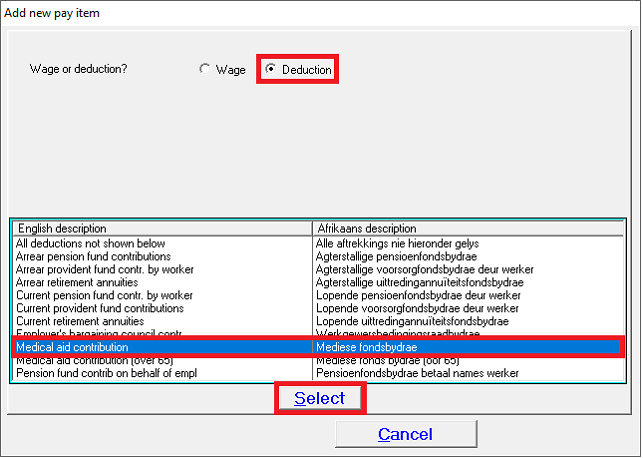 |
- Pay;
- Pay slip items;
- Insert;
- Wage or deduction? Choose Deduction;
- Locate and click on Medical aid contribution;
- Click on Select.
|
|
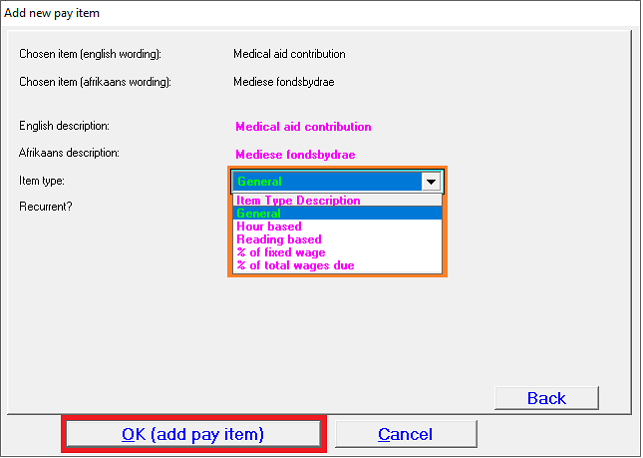 |
- Item type:
Choose one of the following options from the dropdown list:
· General (fixed amount)
· % of fixed wage
· % of total wages due
- Click on OK (add pay item).
|
|
|
|
|
|
|
Contribution description
|
Pay slip item to use
|
SARS code
|
|
Employee contribution reimbursement to add amount to employee’s nett pay
|
Reimbursement medical/pension
|
None
|
|
Screen
|
Steps
|
|
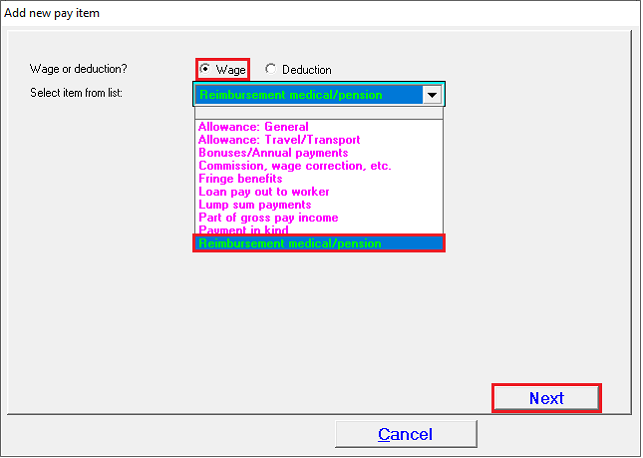 |
- Pay;
- Pay slip items;
- Insert;
- Wage or deduction? Choose Wage;
- Select item from list: Scroll down on dropdown list to locate and click on Reimbursement medical/pension;
- Click on Next.
|
|
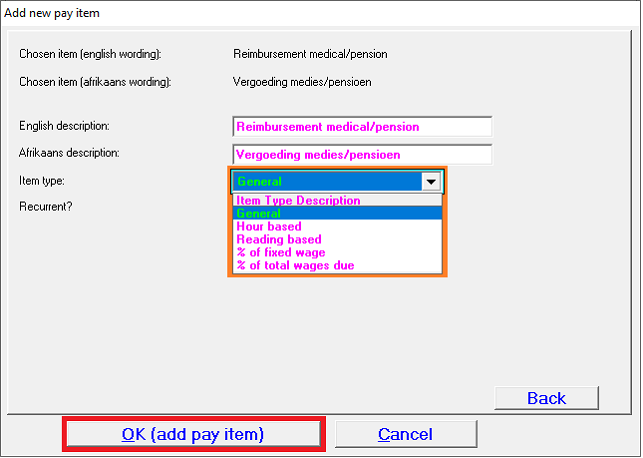 |
- Item type:
Choose one of the following options from the dropdown list:
· General (fixed amount)
· % of fixed wage
· % of total wages due
- Click on OK (add pay item).
|
|
|
Contribution description
|
Pay slip item to use
|
SARS code
|
|
Employer contribution
|
Medical aid contributions by employer
|
3810
|
|
Employee/member contribution
|
Medical aid contribution
|
4005
|
|
Screen
|
Steps
|
|
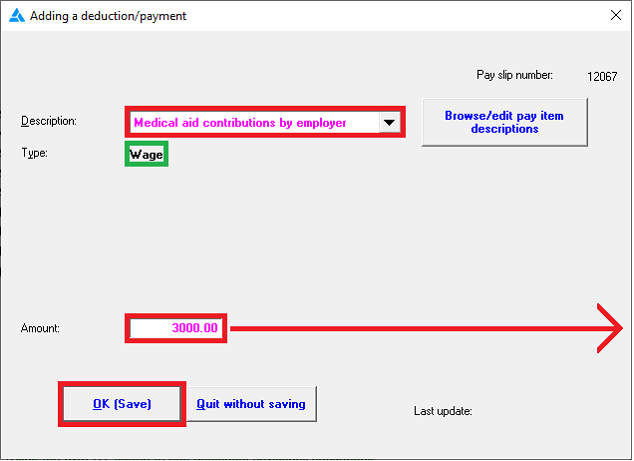 |
Add employer contribution item to pay slip:
- Description: Select Medical aid contribution by employer;
- Amount:
I.e. If the total medical aid contribution (instalment paid over to medical scheme) is R6000 and the employer contributes 50% - The R3000 should be given as a wage to the employee.
- Click on OK (Save).
|
|
 |
Add employee contribution item to pay slip:
- Description: Select Medical aid contribution;
- No. of dependents: The total number of dependents (member included) should be specified when employee/member contribution is inserted on the pay slip. Medical scheme tax credit is also calculated according to this amount.
- Amount: I.e. If the total medical aid contribution (instalment paid over to medical scheme) is R6000 – This amount should be inserted here. In effect the employee only pays R3000 (50%), but the total amount must be deducted.
- Click on OK (Save).
|
|
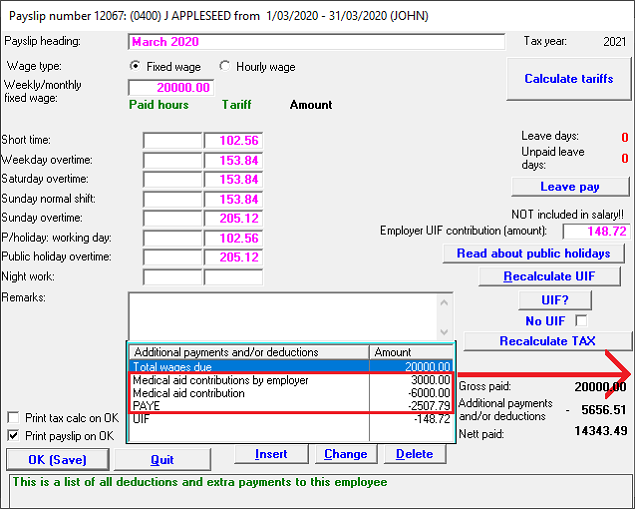 |
Example of pay slip:
PAYE will be adjusted according to the medical scheme tax credit calculation.
|
|
|
Contribution description
|
Pay slip item to use
|
SARS code
|
|
Employer contribution
|
Medical aid contributions by employer
|
3810
|
|
Employee/member contribution
|
Medical aid contribution
|
4005
|
|
Employee contribution reimbursement to add amount to employee’s nett pay
|
Reimbursement medical/pension
|
None
|
|
Screen
|
Steps
|
|
|
Add employer & employee contribution items to pay slips:
|
|
|
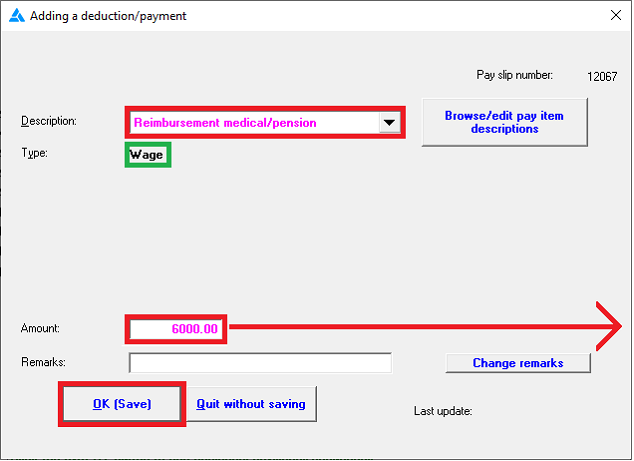 |
Add employee contribution reimbursement item to pay slip:
- Description: Select Reimbursement medical/pension;
- Amount:
This amount must be equal to the employee’s contribution (in this example R6000) that was previously deducted.
- Click on OK (Save).
|
|
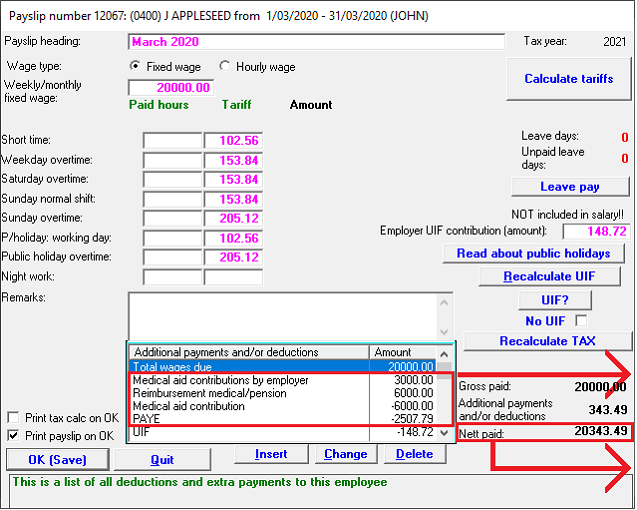 |
Example of pay slip:
PAYE will be adjusted according to the medical scheme tax credit calculation.
Nett pay will be increased by R6000, as the medical scheme's instalment will be deducted from the employee’s salary.
|
|
|
Contribution description
|
Pay slip item to use
|
SARS code
|
|
Employer contribution
|
Medical aid contributions by employer
|
3810
|
|
Employee/member contribution
|
Medical aid contribution
|
4005
|
|
Screen
|
Steps
|
|
 |
Add employer contribution item to pay slip:
- Description: Select Medical aid contribution by employer;
- Amount:
I.e. If the total medical aid contribution (instalment paid over to medical scheme) is R6000 and the employer contributes 100% - The R6000 should be given as a wage to the employee.
- Click on OK (Save).
|
|
|
|
Add employee contribution item to pay slip:
- Description: Select Medical aid contribution;
- No. of dependents: The total number of dependents (member included) should be specified when employee/member contribution is inserted on the pay slip. Medical scheme tax credit is also calculated according to this amount.
- Amount:
I.e. If the total medical aid contribution (instalment paid over to medical scheme) is R6000 – This amount should be inserted here.
- Click on OK (Save).
|
|
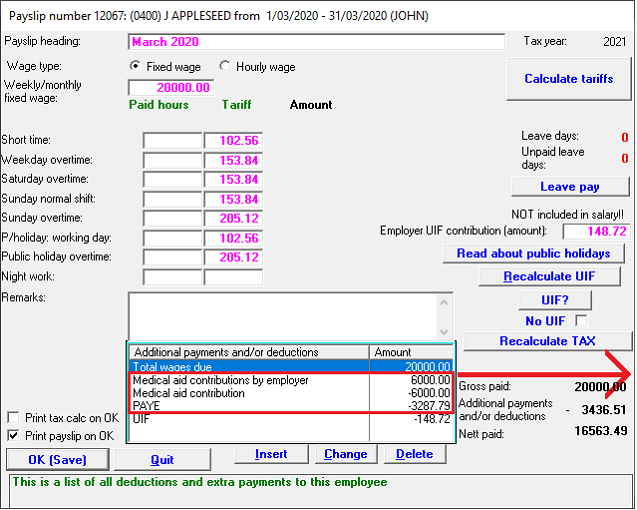 |
Example of pay slip:
PAYE will be adjusted according to the medical scheme tax credit calculation.
|
|
|
Contribution description
|
Pay slip item to use
|
SARS code
|
|
Employer contribution
|
Medical aid contributions by employer
|
3810
|
|
Employee/member contribution
|
Medical aid contribution
|
4005
|
|
Employee contribution reimbursement to add amount to employee’s nett pay
|
Reimbursement medical/pension
|
None
|
|
Screen
|
Steps
|
|
|
Add employer & employee contribution items to pay slips:
Please follow the first two steps as laid out above.
|
|
|
|
|
Add employee contribution reimbursement item to pay slips:
- Description: Select Reimbursement medical/pension;
- Amount:
This amount must be equal to the employee’s contribution (in this example R6000) that was previously deducted.
- Click on OK (Save).
|
|
 |
Example of pay slip:
PAYE will be adjusted according to the medical scheme tax credit calculation.
Nett pay will be increased by R6000, as the medical scheme's instalment will be deducted from the employee’s salary.
|
|
|
Contribution description
|
Pay slip item to use
|
SARS code
|
|
Employee/member contribution
|
Medical aid contribution
|
4005
|
|
Screen
|
Steps
|
|
|
|
Add employee contribution item to pay slips:
- Description: Select Medical aid contribution;
- No. of dependents: The total number of dependents (member included) should be specified when employee/member contribution is inserted on the pay slip. Medical scheme tax credit is also calculated according to this amount.
- Amount:
I.e. If the total medical aid contribution (instalment paid over to medical scheme) is R6000 – This amount should be inserted here.
- Click on OK (Save).
|
|
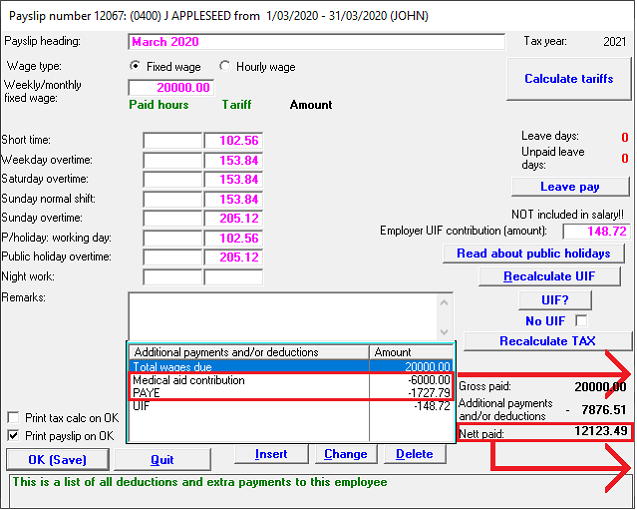 |
Example of pay slip:
PAYE will be adjusted according to the medical scheme tax credit calculation.
Nett pay after the deduction of medical scheme tax credit and medical scheme instalment is paid.
|
|
|
Contribution description
|
Pay slip item to use
|
SARS code
|
|
Employee/member contribution
|
Medical aid contribution
|
4005
|
|
Employee contribution reimbursement to add amount to employee’s nett pay
|
Reimbursement medical/pension
|
None
|
|
Screen
|
Steps
|
|
|
|
Add employee contribution item to pay slips:
- Description: Select Medical aid contribution;
- No. of dependents: The total number of dependents (member included) should be specified when employee/member contribution is inserted on the pay slip. Medical scheme tax credit is also calculated according to this amount.
- Amount:
I.e. If the total medical aid contribution (instalment paid over to medical scheme) is R6000 – This amount should be inserted here.
- Click on OK (Save).
|
|
|
|
Add employee contribution reimbursement item to pay slips:
- Description: Select Reimbursement medical/pension;
- Amount:
This amount must be equal to the employee’s contribution (in this example R6000) that was previously deducted.
- Click on OK (Save).
|
|
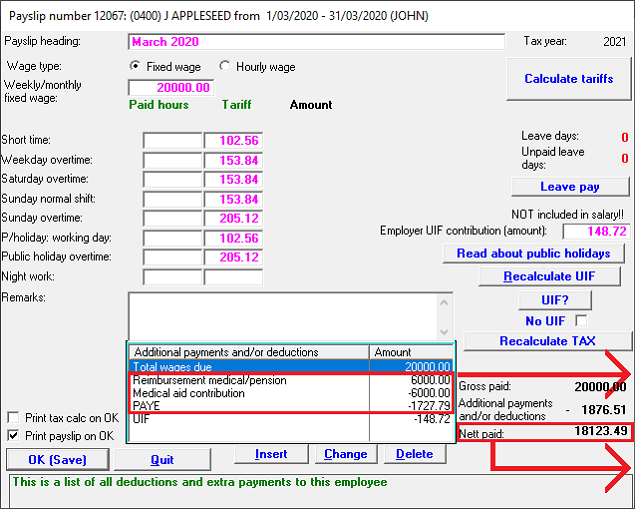 |
Example of pay slip:
PAYE will be adjusted according to the medical scheme tax credit calculation.
Nett pay after the deduction of medical scheme tax credit and medical scheme instalment is reimbursed.
|
|
