Africlock Manual
Menu

Print detail on pay slips

Print detail on pay slips
The layout of the pay slips are fairly fixed. You do have options to display certain details on pay slips or not.
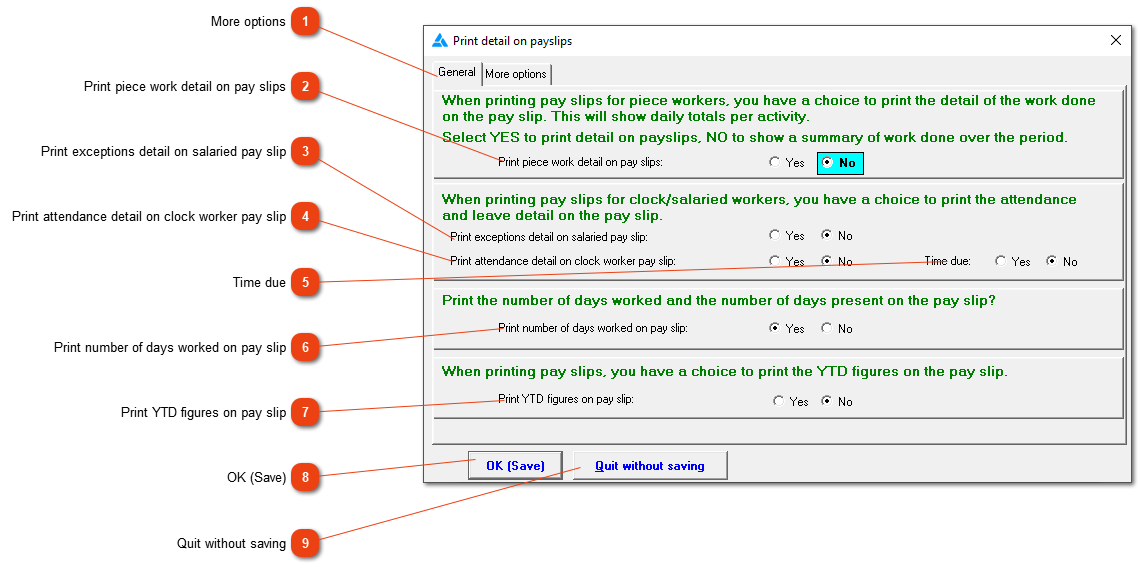
11. More options
Click on the tab 'More options', to find more options regarding the details on pay slips.
2

Print piece work detail on pay slips

2. Print piece work detail on pay slips
Print each piece work entry on the pay slip if you select 'Yes'.
3

Print exceptions detail on salaried pay slip

3. Print exceptions detail on salaried pay slip
Select 'Yes' from the option if you want to show what each day's hours looked like. If there were exceptions loaded, they will then appear here instead of the normal working hours.
4

Print attendance detail on clock worker pay slip

4. Print attendance detail on clock worker pay slip
If the option 'Yes' is checked, the attendance records for the specific period will be displayed on the pay slip.
5

Time due

5. Time due
The attendance records must be printed on the slip for this option to be visible. If 'Yes' is selected, there will be an extra line showing, after the attendance records, that will show the time required for the specific period.
6

Print number of days worked on pay slip

6. Print number of days worked on pay slip
Select this option if you want to see the following two lines on the pay slips: Total days present; Working days present.
7

Print YTD figures on pay slip

7. Print YTD figures on pay slip
The following three items' year to date figures will appear on the pay slip if the 'Yes' option is selected: Gross pay; Taxable; Tax paid.
88. OK (Save)
Save the information.
99. Quit without saving
Close the window without saving.
 
The online help was made with Dr.Explain