Africlock Manual
Menu

Print payroll estimate

Print payroll estimate
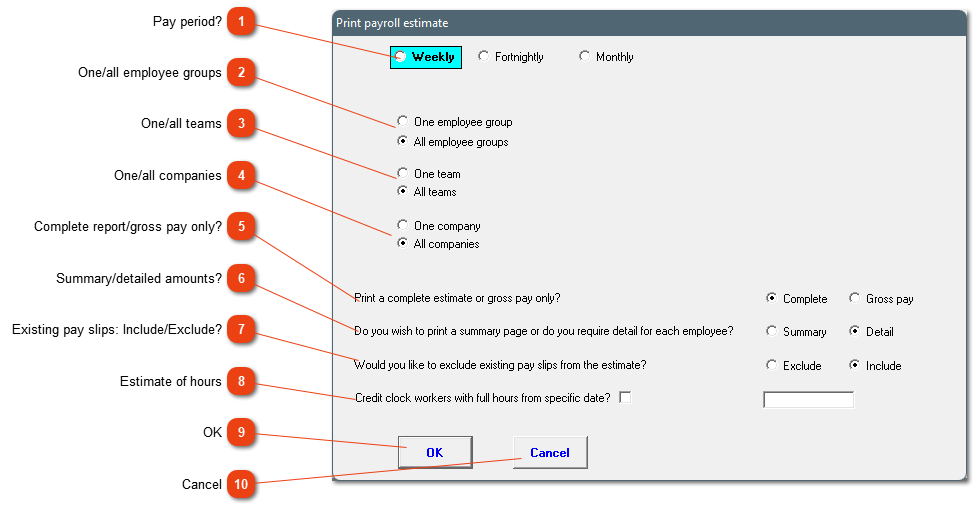
This is ONLY an estimate of the payroll for a certain period. UIF and PAYE isn't included. There are various filters applicable. TAKE NOTE, this is only a 'guess' using information available to the system.
 
1

Pay period?

1. Pay period?
You need to select the pay period - how the employees are set up on the system. You cannot do a weekly estimate if the employees are paid monthly. You can only do an estimate for the upcoming pay period. A yearly estimate can not be done with this function.
2

One/all employee groups

2. One/all employee groups
Do you want to print the report for one specific group or all employee groups? The report will only include employees whose pay period are correct.
3

One/all teams

3. One/all teams
Do you want to print the report for one specific team or all teams? The report will only include employees whose pay period are correct.
4

One/all companies

4. One/all companies
Do you want to print the report for one specific company or all companies? The report will only include employees whose pay period are correct.
5

Complete report/gross pay only?

5. Complete report/gross pay only?
The complete report will include recurrent pay slip items, where the gross pay option will only look at hours.
6

Summary/detailed amounts?

6. Summary/detailed amounts?
The summary option gives a sum total for each employee. The detailed option gives a lot more detailed information, for example an estimate of hours, what deductions/extra income are on the slips, etc. Take note, percentage items on the pay slip, cannot be added on the estimate.
7

Existing pay slips: Include/Exclude?

7. Existing pay slips: Include/Exclude?
Should existing pay slips in the period be added to the total of the estimate or not?
8

Estimate of hours

8. Estimate of hours
Do you want the system to include possible working hours up to the end date of the estimate?
99. OK
Generate the report according to specifications.
1010. Cancel
Close the screen without generating the report.
The online help was made with Dr.Explain