TODO: To change the footer's content go to Dr.Explain menu Options : Project Settings : HTML (CHM) Export : Setup HTML Template and Layout
Add pay slip item: Maximum and minimum deductions
A pay slip item can be set up so that the system deducts a maximum and/or minimum amount each time. Sometimes unions has certain prescriptions that the deduction must be a percentage of the employee's fixed wage, but the amount cannot be less than a certain amount, and there is a threshold for the maximum amount.
Requirements in creating an item like this:
It must be a deduction.
It must be a % item.
How do you create an item like this?
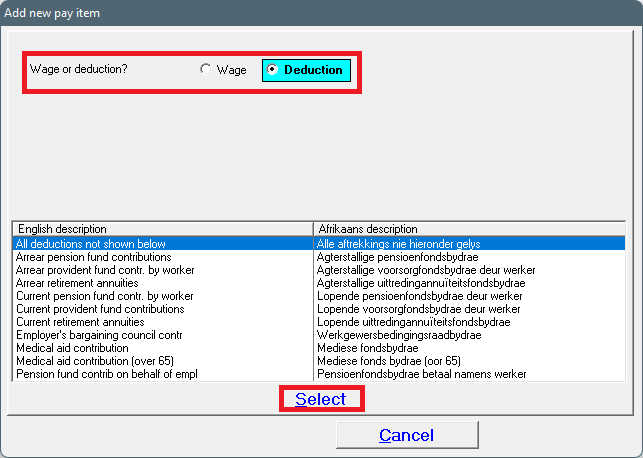
1. Add a new pay slip item, by choosing 'Insert' under 'Pay slip items'. If the item already exists, you can edit it. If the item doesn't have an IRP5 code, it can be changed without a password, otherwise you'll have to phone the office for help.
2. It is always best to phone the office if you're creating pay items with tax implications. If it is only a union deduction, without any tax benefits and specific IRP5 codes, the top option - 'All deductions not shown below' - can be chosen.
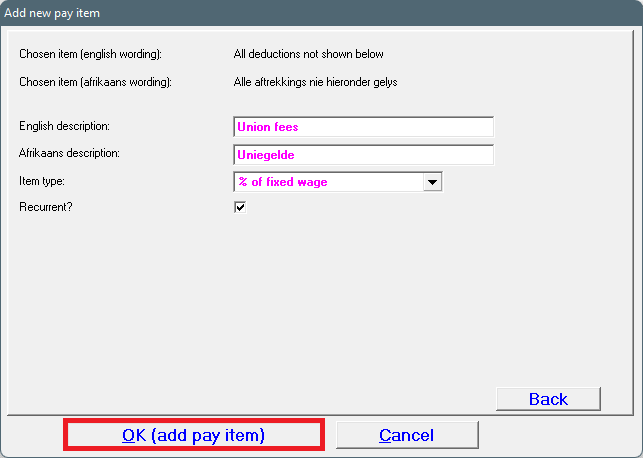
3. Give the item an Afrikaans and English description, choose the applicable item type (one of the % items) and mark the item as recurrent (this will be added on the following pay slips automatically).
4. This item will now be available on your pay slip item list. The item must be changed now to add the minimum and maximum amounts.
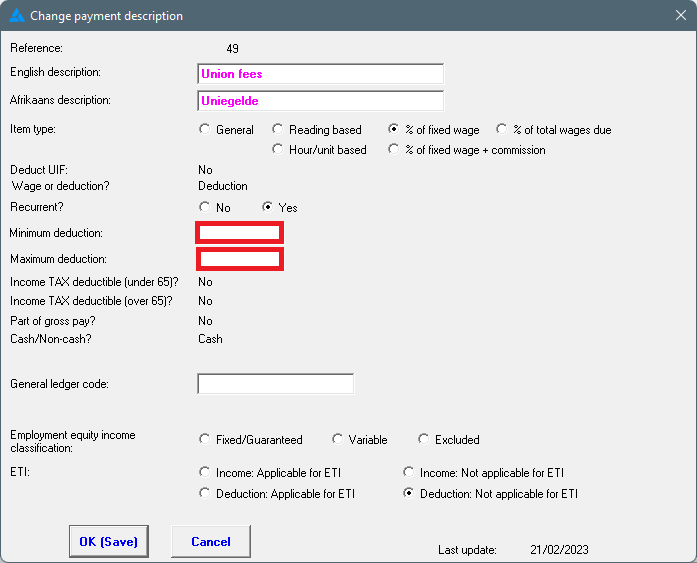
5. Highlight the applicable item and click on 'Change'. The following screen will open.
6. The maximum and minimum deduction fields will now be open.
7. Add the minimum and/or maximum amounts and click on 'OK (Save)'.