Africlock Manual
Menu

Change: Updating time programme definition

Change: Updating time programme definition
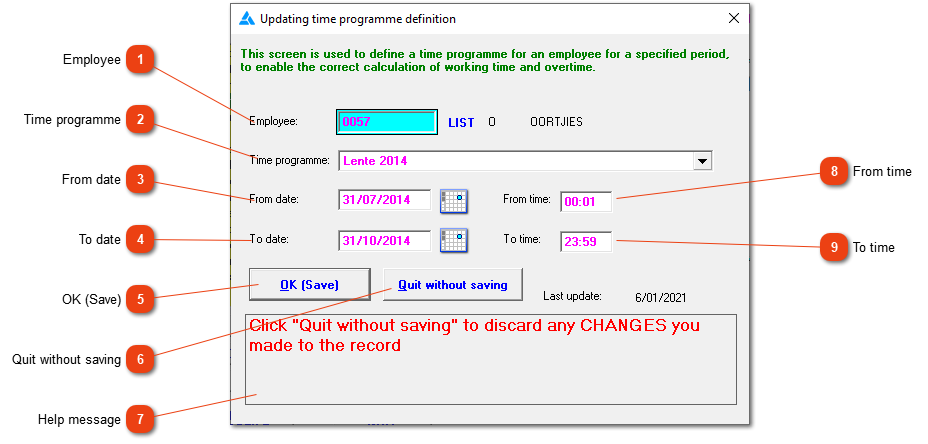
If the wrong time programme or date has been selected or if the time programme should be ended, this option is the right option to use.
1

Employee

1. Employee
Make sure that the right employee is selected here, his/her initials and surname will be next to the selected employee number.
2

Time programme

2. Time programme
The time programme applicable will be selected here. Please do not change the time programme if it has already been used for data processing. It is then much better to end the time programme by inserting a date at the 'to date' and a time at the 'to time' and defining a new time programme.
3

From date

3. From date
This is the first date that the employee should be linked to the time programme. This will correspond with the appointed date if there hasn't been any changes made. If the wrong appointed date has been selected and corrected, the time programme date should be manually adjusted (in other words the system doesn't change the dates automatically).
4

To date

4. To date
The last date that the time programme should be used to calculated hours.
55. OK (Save)
Click here to save the information.
66. Quit without saving
Close the screen without saving.
7

Help message

7. Help message
This is a help area with context sensitive messages to assist you in completing the form.
8

From time

8. From time
From experience it is easier to set the 'from time' as 00:01 instead of switching to a new time programme at an exact time during the day.
9

To time

9. To time
From experience, it is easier to set the end time as 23:59 and to start a new time programme on the next date.
 
The online help was made with Dr.Explain