TODO: To change the footer's content go to Dr.Explain menu Options : Project Settings : HTML (CHM) Export : Setup HTML Template and Layout
Change leave options
Various options that can be changed on the system with regards to leave.
Leave calculation method
'Calendar days' will consider the length of the employee's leave to be equal to the total number of days in the leave period, whereas 'Working days' will count only the number of days he/she would normally have worked during that period.
If your leave balances are not activated, this option along with the 'Default method' and 'Print leave balances on pay slip?' will be hidden. To activate the leave balances, the pay slip module must be used. Please phone the office to get this activated. All that we need is the leave balance for each employee, as at the 1st of January of the current year.
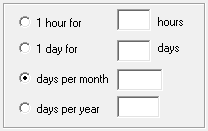
Leave can be calculated in different ways on the system. 1 hour for 17 hours worked, 1 day for 17 days worked, 1.25 days per month or 15 days per year are general methods. The default method for each company are shown here. Please contact us to discuss the different options. The employee's contract should specify how leave is calculated.