Africlock Manual
Menu

Pay slips

Pay slips
This list shows all the employee's pay slips, with the latest one at the top. You can create, change or delete pay slips and print selected ones individually. N.B. Only the latest pay slip can be changed or deleted.
11. Deleted?
Check this block if you want to see deleted pay slips. The deleted pay slips will be shown in grey.
22. Delete
Delete the employee's latest pay slip (you can only delete the newest pay slip if the EMP201 has not been printed).
33. Print highlighted payslip
Print the highlighted pay slip. This will open a print preview where you can decide if you want to print or save the document as a pdf.
44. Pay slip items
Opens the list of pay slip item descriptions.
55. Pay slip size
If you want to print pay slips, first set the paper size here.
66. Insert
Click here to create a new pay slip for the employee.
77. Change
Edit the employee's latest pay slip (only the newest pay slip).
88. Print adjusted hours explanation
Click on the pay slip in question (this will now be marked in blue). Click this button to have a look at the 'adjusted hour explanation'
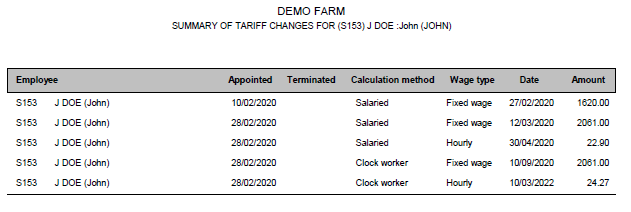
99. Wage changes
A summary of the specific employee's tariff changes.
 
1010. Print detail of pay slips
This printout can be printed over a period of time where every pay slip's detail in that time period will be shown.
 
The online help was made with Dr.Explain