Re-employment - other steps
To re-employ an employee previously terminated, follow the steps below:
1. Click on the Main Screen on: Personnel.
2. Look at the top of the screen for the white block, and mark it, by clicking in the tick block. Show previous (displayed in RED):
3. A list of all employees, current and terminated employees, will be shown.
4. Double click on the name of the employee to be re-instated:
5. The employee's personal profile will be displayed.
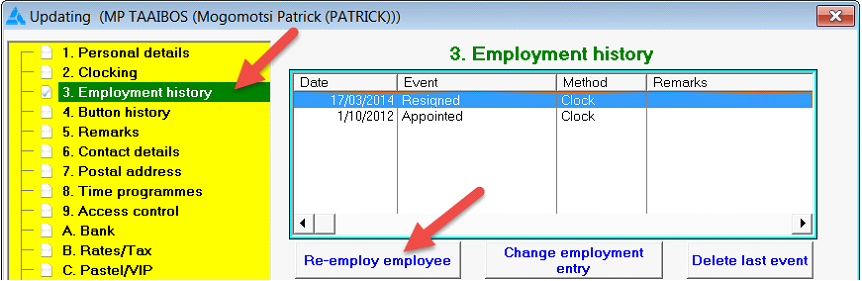
6. Select Nr. 3 in the yellow block: Employment history.
7. Select from the options on the right hand side on the white screen: Re-employ employee:
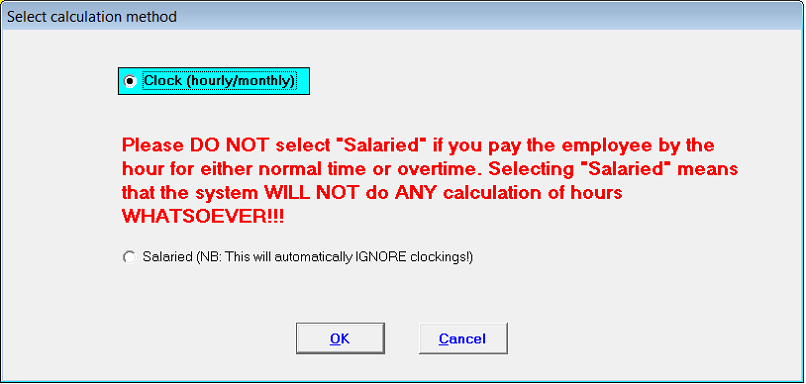
8. Select the calculation method applicable:
9. Complete the appointment details on the screen that follows and allocate a button to the employee, if the employee is a clock worker:
10. Click at the bottom on: OK
11. The employee will be listed under the active employees on the Employee List: