Africlock Manual
Menu

Transfer employee from one company to another

Transfer employee from one company to another
The new company must already be added on the system before employees can be transferred. Please do not edit the existing company with the new company's information. A new separate company must be added here.
1

Employee to be transferred

1. Employee to be transferred
Choose the appropriate employee from the list.
2

Current company

2. Current company
The company the employee is currently in will appear here.
3

Transfer to

(another company)

3. Transfer to 
(another company)
Choose the new company here.
4

Transfer date

4. Transfer date
Please make sure about the date of transfer. A pay slip must be created on the old company up to the day before the transfer (in this case until 27/07/2020).
5

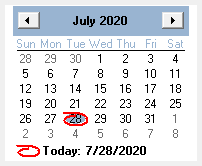
Calendar

5. Calendar
You can choose the date on the calendar if you do not want to type it in.
66. OK
Click here to transfer the employee.
77. Quit
Close the window without saving the information.
8

Help message

8. Help message
This is a help area with context sensitive messages to assist you in completing the form.
The online help was made with Dr.Explain