Summary of wages - Employee totals
A report is available that shows all the salaries payable for a specific month/period by following the steps below:
1. Click on the main screen on: Pay:
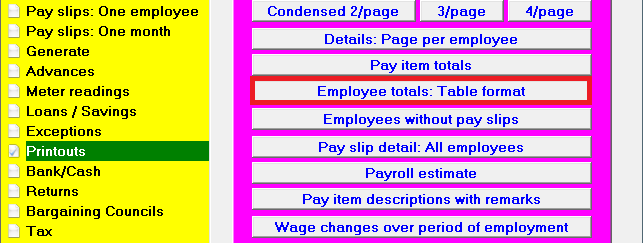
2. Select from the options in the yellow block: Printouts.
3. Select from the options on the right hand side in pink/blue: Employee totals: Table format
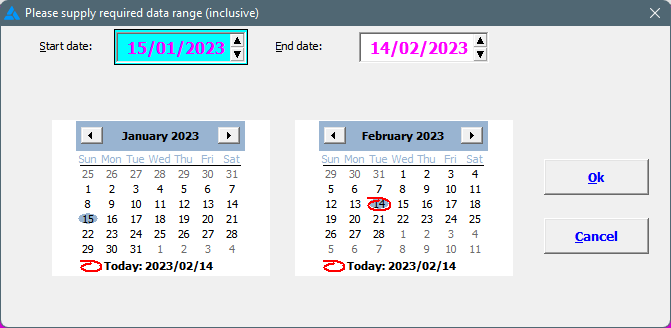
4. Supply the required data range (start date / end date):
5. Various options can be chosen to print the report according to your specifications. See
here.
6. A
report for the selected period will be printed with the following: Income, deductions, UIF, gross amount for tax, total tax deducted (repaid) and the nett income.
7. The report can be exported to
Excel where more information will be shown.
The same report as discussed above, can be printed for a specific tax year.
1. Click on the main screen on: Pay:
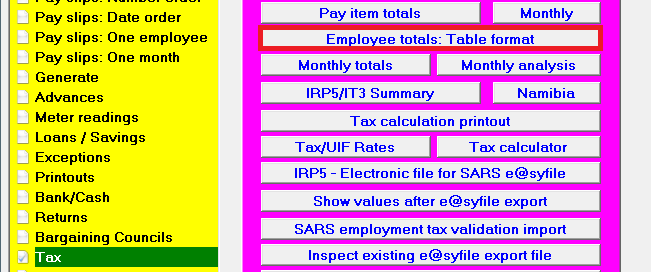
2. Select from the options in the yellow block: Tax.
3. Select from the options on the right hand side in pink/blue: Employee totals: Table format
4. Choose the applicable tax year and click okay.
5. Choose if the report should be for one or all employee groups, as well as for one or all companies.
6. A report with the totals for the chosen tax year will be shown with the same headings as indicated above.