Africlock Manual
Menu

Terminate an employee's services

Terminate an employee's services
This window is used to record the fact that an employee is no longer in your service. If there is anything outstanding on an employee, the system will not be able to terminate their services. This is discussed in more details under 'Pay'.
 
1

Options

1. Options
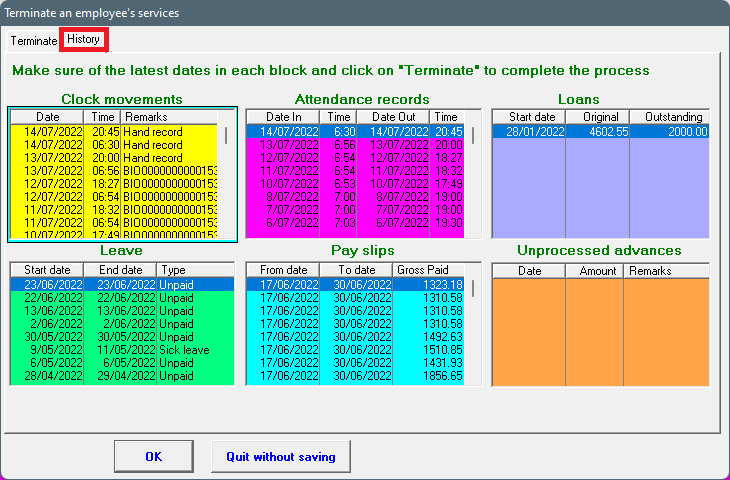
The second tab shows the employee's history with regards to clock movements, attendance records, leave records, loans, unprocessed advances and pay slips. This is just information and cannot be edited.
2

Employee

2. Employee
Enter the employee number (or use the 'List' button to select the employee from a list).
3

Reason for termination

3. Reason for termination
Indicate why this person is no longer in your employ.
4

Date

4. Date
Enter the date of the employee's last working day.
5

Remarks

5. Remarks
You can make whatever notes you think necessary for future reference here, e.g. 'Never employ this person again!'.
66. OK
Save the values currently displayed.
7

Last changes/information on worker

7. Last changes/information on worker
A brief history can be seen herewith regards to the employee's last clock movement, attendance record, leave day and pay slip.
88. View history
This opens the second tab as discussed under options (number 1).
9

Help message

9. Help message
This is a help area with context sensitive messages to assist you in completing the form.
1010. Quit without saving
Close the window without saving anything.
 
The online help was made with Dr.Explain